

Node reference
The Nodes tab of the activity editor lists every node type in five groups. Click one to add it, or drag it onto the diagram. The Details tab shows only the fields that type accepts.
Questions: capturing data
Questions capture what the health worker sees, asks or measures.
| Node | Captures |
|---|---|
| Single choice | One answer from a list |
| Multiple choice | Any number of answers from a list |
| Yes or no | A yes / no answer |
| Whole number, Decimal number | A number, with an optional minimum and maximum |
| Quantity | A number with its unit (unit, unit system, unit code) |
| Text | Free text |
| Date | A date |
Every question collects a concept: what is recorded, with its code and data type, from the data dictionary. A question can also carry:
- a constraint in CQL, and the message shown when it fails;
- Required;
- a hint, help and pictures, kept on the concept so they are translated once.
On a choice question, each answer is a row with its own handle: you connect from the answer itself. One answer can be marked None of these ("No danger sign").
Note: giving information
A Note shows a message to the user. Like a question, it can have a hint, help and pictures. Its text can include calculated values, chosen from Insert data in the text editor.
Logic: calculating and deciding
Calculation computes a value with CQL in Calculation — CQL. It can also record that a path was reached: a boolean that is true when the flow gets there.
Count and Add count, or sum, the values that reach them along the diagram.
Decision (the rhombus) forks the logic. Its Decision — CQL holds the condition, and each connection leaving it is one of:
- Yes: followed when the condition is true;
- No: followed when it is not true (false or unknown);
- Follow: always followed. The decision then only joins paths.
Drawing a connection from a decision asks which one it is.
Not negates what reaches it.
A connection from another node can carry its own Condition (CQL) or a Score, set in the connection's details.
Write CQL by name: typing a concept in double quotes, such as "weight" > 9, shows a chip with the concept's label.
Clinical
- Diagnosis and Proposed diagnosis apply when their Applies when — CQL is true, and can carry a severity and a priority.
- They stand on their own on the diagram: they are not connected into the flow of questions.
- Their concepts belong in the calculate dictionary.
Data
Prefilled value brings in data that the activity does not ask for, because it is known before the encounter starts, such as the malaria risk of the area. Read from says where it comes from: patient, facility, practitioner, location, encounter or history.
Flow: how the diagram runs
| Node | What it does |
|---|---|
| Start | Where a process starts. A process activity has exactly one, and its Starts field names the care segment. |
| Activity start | Where an activity starts. An activity has exactly one. |
| Activity end | When every path has reached an activity end, the activity is done. There may be several. |
| End | Ends the encounter. |
| Go to activity | Stands for another activity, chosen in Goes to, which is run at that point. Open activity (or Ctrl-click) opens it. A target that no longer exists shows Missing activity. |
| Block start | Where a building block starts. A block has exactly one; it is placed for you. See Building blocks. |
| Use block | Puts a copy of a building block, chosen in Uses the block, at that point, with the values set for this use. Open block opens it. See Building blocks. |
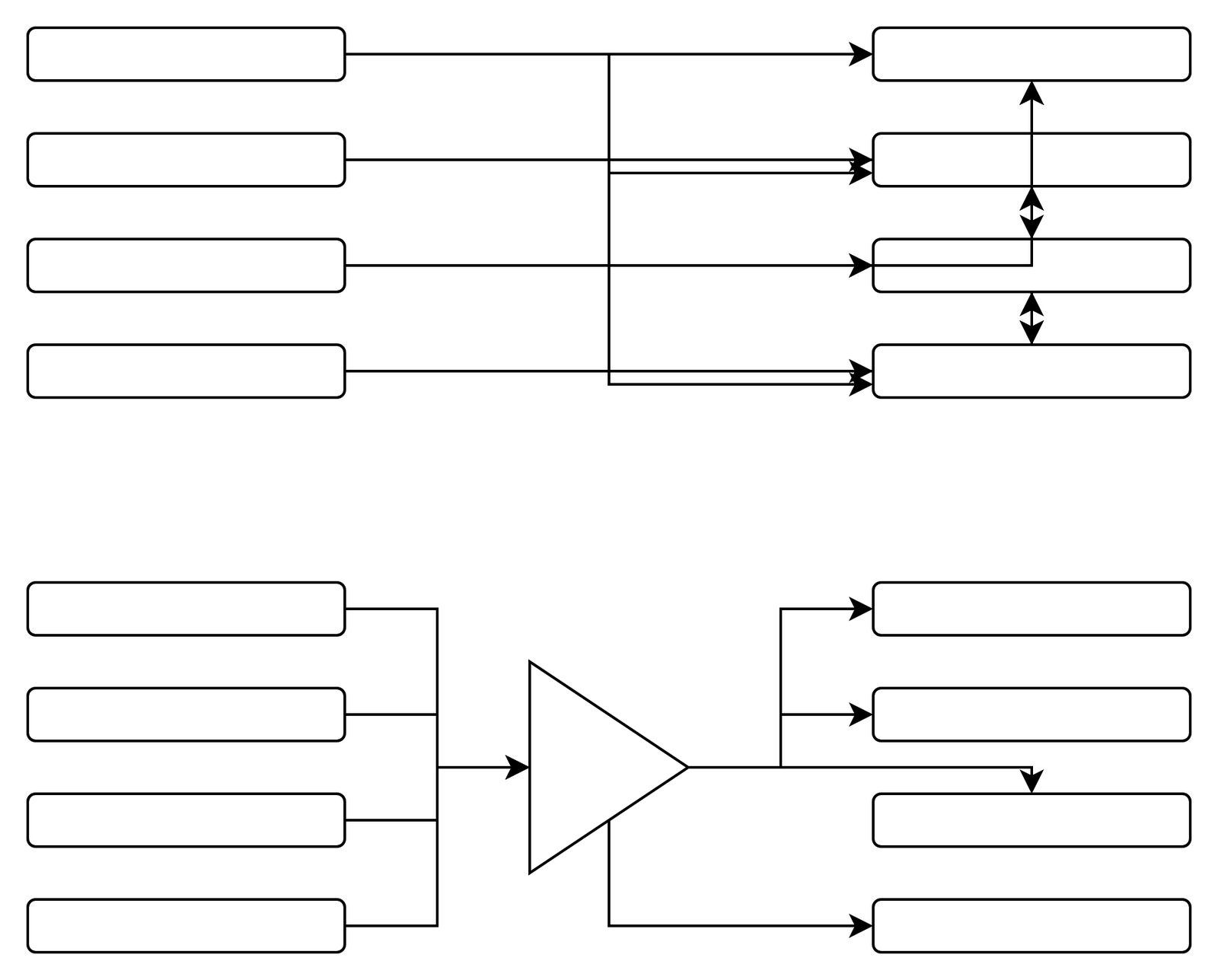
| Bridge | A point where several paths meet before going on (see below). |
| Wait | Holds the flow until the nodes it waits for are processed. |
| Continue with | Starts another intervention later: its target intervention, start condition and delay. |
| Link in, Link out | Stand in for a long connection, to keep a busy diagram readable. |
Both kinds of start may have an applicability condition that governs the whole activity or process.
Bridges keep diagrams readable
When four paths each lead to the same four targets, that is 16 connections. Through a bridge it is 8:
Coming from draw.io
Drawings mark a decision's condition in its reference attribute, name it r_, and point a goto at another page with draw.io's link to another tab. The app reads all of this when it opens a drawing. You then use Decision — CQL and Goes to instead. Pause and "end to" ends (process=pause, or the process to jump to) are read from drawings, but have no field in the app yet.