
This vignette introduces healthiar and shows how to use it
with the help of examples. In addition, the descriptions of the healthiar
functions include short examples for every function, also for helper
functions that this vignette only mentions
(e.g. get_risk(), get_paf() or
discount()). You can execute them (with healthiar
loaded) by running example("function_name"),
e.g. example("get_risk").
Before using healthiar, please read the README or the package website. By using healthiar, you agree to its disclaimer and license.
About healthiar
The healthiar functions allow you to quantify and monetize the health impacts (or burden of disease) attributable to exposure. The main focus of the EU project that initiated the development of healthiar (BEST-COST) has been two environmental exposures: air pollution and noise. However, healthiar could be used for other exposures such as green spaces, chemicals, physical activity…
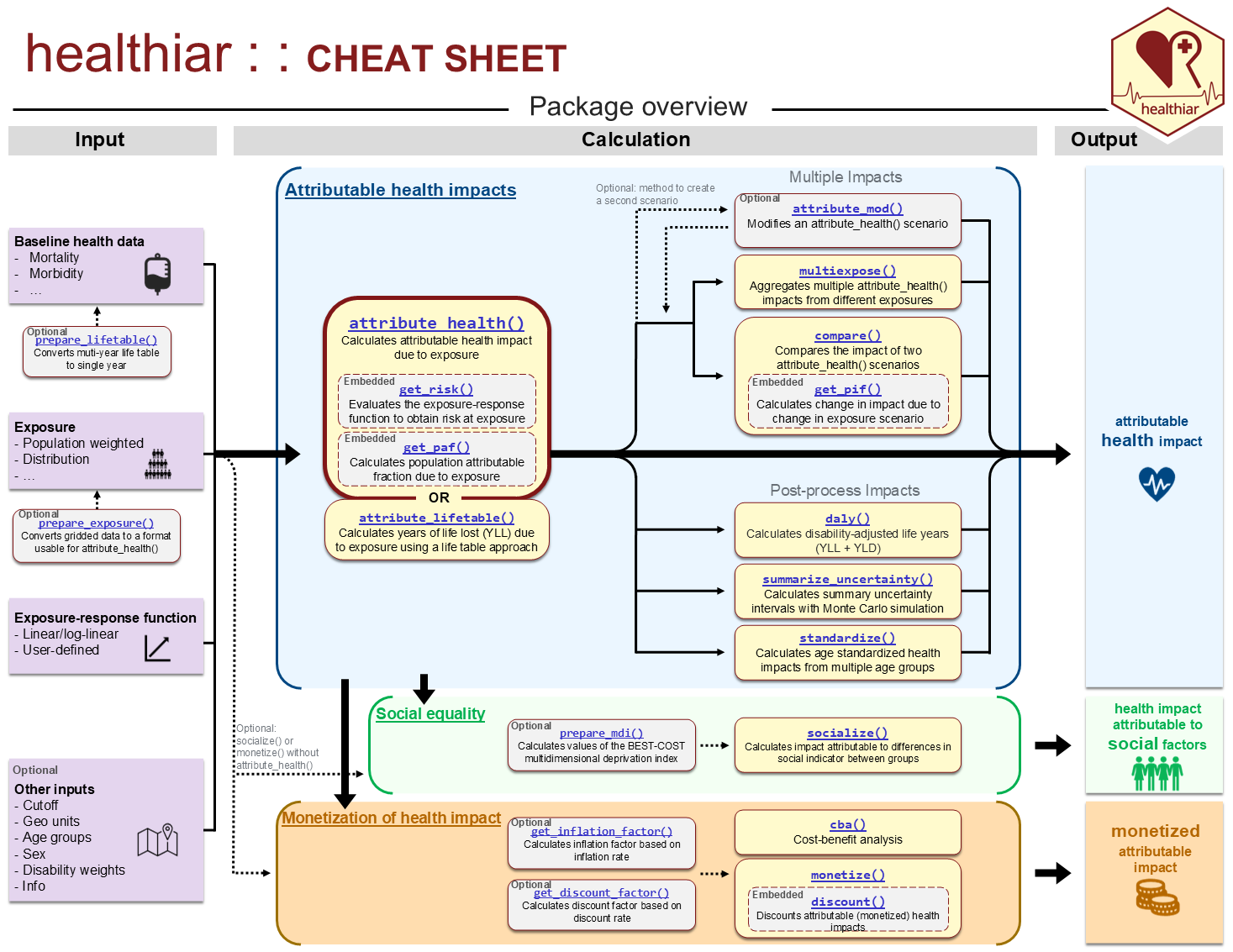
See below an overview of healthiar, which is the first page of the cheat sheet. The whole list of functions included in healthiar is linked there and available in the reference.
Input & output data
Input
You can enter data in healthiar functions using: - hard coded values or - columns inside pre-loaded data frames or tibbles.
Let’s see some examples calling the most important function in
healthiar: attribute_health().
Hard coded vs. columns
Hard coded
Depending on the function argument, you will need to enter numeric or character values.
results_pm_copd <- attribute_health(
  exp_central = 8.85,
  rr_central = 1.369,
  rr_increment = 10,
  erf_shape = "log_linear",
  cutoff_central = 5,
  bhd_central = 30747
)
Columns
healthiar comes with some example data that start with
exdat_ that allow you to test functions. Some of these
example data will be used in some examples in this vignette.
Now let’s call attribute_health() with input data from
the healthiar example data. Note that you can easily provide
input data to the function argument using the $
operator.
results_pm_copd <- attribute_health(
  erf_shape = "log_linear",
  rr_central = exdat_pm$relative_risk,
  rr_increment = 10,
  exp_central = exdat_pm$mean_concentration,
  cutoff_central = exdat_pm$cut_off_value,
  bhd_central = exdat_pm$incidence
)
Tidy data
Be aware that healthiar functions are easier to use if your data is prepared in a tidy format, i.e.:
Each variable is a column; each column is a variable.
Each observation is a row; each row is an observation.
Each value is a cell; each cell is a single value.
To know more about the concept of tidy format, see the article by (Wickham 2014).
For example, in attribute_health() the length of the
input vectors to be entered in the arguments must be either 1 or the
result of the combinations of the different values of:
geo_id_microexp_...sexage(
infofor further sub-group analysis)
Output
Structure
The output of the healthiar functions
attribute_health() and attribute_lifetable()
consists of two lists (“folders”):
health_maincontains the main resultshealth_detailedcontains detailed results and additional info about the assessment.
In other healthiar functions you can find a similar output
structure but using different prefixes. E.g., social_ in
socialize() and monetization_ in
monetize().
Access
A similar structure can be found in other large functions in
healthiar, e.g., attribute_lifetable(),
compare(), socialize() or
monetize(). In some functions, different elements are
available in the output. For instance,
attribute_lifetable() creates additional output that is
specific to life table calculations.
There exist different, equivalent ways of accessing the output:
With
$operator:results_pm_copd$health_main$impact_rounded(as in the example above)By mouse: in the pane of your editor that lists the variables (e.g. Environment in RStudio), click on the variable you want to inspect, and then open the
health_mainresults tableWith
[[]]operatorresults_pm_copd[["health_main"]]With
pluck()&pull(): use thepurrr::pluckfunction to select a list and then thedplyr::pullfunction extract values from a specified column, e.g.results_pm_copd |> purrr::pluck("health_main") |> dplyr::pull("impact_rounded")
Relative risk
Goal
To quantify the health impacts attributable to an exposure using a relative risk and baseline health data.
Methods
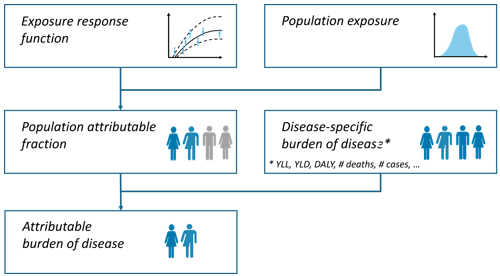
The comparative risk assessment approach (C. J. Murray et al. 2003) is applied obtaining the population attributable fraction (percent of cases that are attributable to the exposure) based on the relative risk. The exposure scenario is compared with a counterfactual scenario.
This approach has been extensively documented and applied (e.g., WHO 2003; Steenland and Armstrong 2006; Soares et al. 2022; Pozzer et al. 2023; GBD 2019 Risk Factors Collaborators 2020; Lehtomäki et al. 2025).
Population attributable fraction
General integral form for the population attributable fraction (PAF):
Where:
= exposure level
= proportion of the population exposed at exposure level
= relative risk at exposure level compared to the reference level
Simplified for categorical exposure distribution
If exposure is categorical, the integrals are converted to sums:
Alternatively, an equivalent form is:
healthiar uses this second form, which is the one published
as Formula 3 in ETC
HE Report 2023/11. Note that
is the proportion of the total population in the exposure
category
,
so the
do not have to add up to 1: the part of the population that
they do not cover is treated as unexposed, i.e. it gets the relative
risk of the reference level. In air pollution assessments everybody is
usually exposed and the
add up to 1, whereas in noise assessments they typically add up to less
than 1, because exposure is only reported above a given level.
Accordingly, the baseline health data entered in bhd_...
must always refer to the total population. The first form above divides
by
instead and is therefore only equivalent when
.
Simplified for single exposure value
If there is one single exposure value, corresponding to the population weighted mean concentration, the equation can be simplified as follows:
#### Scaling relative risk How to get this relative risk at exposure
level (rr_at_exp)? This is normally different to the
relative risk published in the epidemiological literature
(rr) together with the (concentration/dose)
increment that corresponds to this relative risk. The
equations used for scaling relative risk depend on the chosen
exposure-response function shapes:
linear (Lehtomäki et al. 2025)
log-linear (Lehtomäki et al. 2025)
log-log (Lehtomäki et al. 2025)
linear-log (Pozzer et al. 2023)
The relative risk at exposure level (rr_at_exp) is part
of the output of attribute_health() and
attribute_lifetable(). rr_at_exp can also be
calculated using get_risk().
For conversion of hazard ratios and/or odds ratios to relative risks refer to (VanderWeele 2019) and/or use the conversion tools developed by the Teaching group in EBM in 2022 for hazard ratios (https://ebm-helper.cn/en/Conv/HR_RR.html) and/or odds ratios (https://ebm-helper.cn/en/Conv/OR_RR.html).
Example
In the example below, we quantify the COPD cases attributable to
PM2.5 exposure in a country, using the example data
exdat_pm.
Function call
results_pm_copd <- attribute_health(
  approach_risk = "relative_risk", # If you do not call this argument, "relative_risk" will be assigned by default.
  erf_shape = "log_linear",
  rr_central = exdat_pm$relative_risk,
  rr_increment = 10,
  exp_central = exdat_pm$mean_concentration,
  cutoff_central = exdat_pm$cut_off_value,
  bhd_central = exdat_pm$incidence
)
Main results
results_pm_copd$health_main
#> # A tibble: 1 × 24
#>   geo_id_micro erf_ci  exp_ci  bhd_ci  cutoff_ci exp_category sex   age_group
#>   <chr>        <chr>   <chr>   <chr>   <chr>            <int> <chr> <chr>
#> 1 a            central central central central              1 all   all
#> # ℹ 16 more variables: impact <dbl>, impact_rounded <dbl>, approach_risk <chr>,
#> #   rr_increment <dbl>, erf_shape <chr>, prop_pop_exp <dbl>, exp_length <int>,
#> #   exp_type <chr>, exp <dbl>, bhd <dbl>, cutoff <dbl>, rr <dbl>,
#> #   is_lifetable <lgl>, pop_fraction_type <chr>, rr_at_exp <dbl>,
#> #   pop_fraction <dbl>
It is a table of the format tibble of 3 rows and 23
columns. Be aware that this main output contains input data, some
intermediate steps and the final results in different formats.
Let’s zoom in on some relevant aspects.
results_pm_copd$health_main |>
  dplyr::select(exp, bhd, rr, erf_ci, pop_fraction, impact_rounded) |>
knitr::kable() # For formatting reasons only: prints tibble in nice layout| exp | bhd | rr | erf_ci | pop_fraction | impact_rounded |
|---|---|---|---|---|---|
| 8.85 | 30747 | 1.369 | central | 0.1138961 | 3502 |
Interpretation: this table shows us that exposure was 8.85
,
the baseline health data (bhd_central) was 30747 (COPD
incidence in this instance). The 1st row further shows that the impact
attributable to this exposure using the central relative risk
(rr_central) estimate of 1.369 is 3502 COPD cases, or ~11%
of all baseline cases.
Some of the most relevant results columns include:
- impact_rounded rounded attributable health impact/burden
- impact raw impact/burden
- pop_fraction population attributable fraction (PAF) or population impact fraction (PIF)
Absolute risk
Goal
To quantify the health impacts attributable to an exposure using an absolute risk, i.e. based on the exposed population instead of baseline health data.
Methods
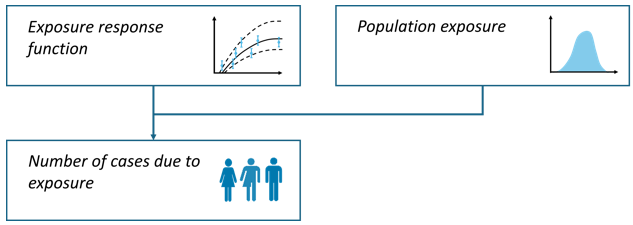
In the absolute risk calculation pathway, estimates are based on the size and distribution of the exposed population, rather than on baseline health data, as is the case in the relative risk pathway (WHO 2011).
Where:
= attributable cases
= absolute risk (in %) at exposure category , obtained from the exposure-response function entered in
erf_eq_...= absolute population exposed at exposure category
healthiar consistently handles cut-off values across both
relative and absolute risk approaches. When a cutoff_
argument is specified alongside an exposure–response function
(erf_eq_), the function evaluates exposure as excess
exposure relative to the cut-off (c as
),
effectively shifting the function by the cut-off. However, many absolute
risk curves published in the literature are parameterized on raw
exposure levels that already incorporate the cut-off directly into the
function definition. Therefore, healthiar issues an informative
warning if both erf_eq_ and a cutoff_ are
specified when using attribute_health(). If your absolute
risk function is parameterized on raw exposure levels rather than on the
exposure above the cut-off, see chapter Shifting the ERF.
Example 1: several exposure categories
In the example below, we quantify the cases of high annoyance attributable to road traffic noise in five noise exposure bands.
Function call
results_noise_ha <- attribute_health(
  approach_risk = "absolute_risk", # default is "relative_risk"
  exp_central = c(57.5, 62.5, 67.5, 72.5, 77.5), # mean of the exposure categories
  pop_exp = c(387500, 286000, 191800, 72200, 7700), # population exposed per exposure category
  erf_eq_central = "78.9270-3.1162*c+0.0342*c^2" # exposure-response function
)
The erf_eq_central argument can digest other types of
functions (see section on user-defined ERF).
Main results
results_noise_ha |>
  purrr::pluck("health_main") |>
  dplyr::select(erf_eq, erf_ci, impact_rounded) |>
knitr::kable() # Prints tibble in a minimal layout| erf_eq | erf_ci | impact_rounded |
|---|---|---|
| 78.9270-3.1162c+0.0342c^2 | central | 174232 |
Results per noise exposure band
results_noise_ha[["health_detailed"]][["results_raw"]] |>
  dplyr::select(exp_category, exp, pop_exp, impact) |>
knitr::kable()| exp_category | exp | pop_exp | impact |
|---|---|---|---|
| 1 | 57.5 | 387500 | 49674.594 |
| 2 | 62.5 | 286000 | 50788.595 |
| 3 | 67.5 | 191800 | 46813.105 |
| 4 | 72.5 | 72200 | 23657.232 |
| 5 | 77.5 | 7700 | 3298.314 |
Example 2: one exposure category
Alternatively, it’s also possible to only assess the absolute risk impacts for one exposure category (e.g., a single noise exposure band).
Function call
results_noise_ha <- attribute_health(
  approach_risk = "absolute_risk",
  exp_central = 57.5,
  pop_exp = 387500,
  erf_eq_central = "78.9270-3.1162*c+0.0342*c^2"
)Notes
Important: If the equation of the exposure-response
function (erf_eq_...) requires taking a maximum in a
vectorised context, pmax() must be used instead of
max(). pmax() should be used whenever an
element-wise maximum is required (the output will be a vector), while
max() returns a single global maximum for the entire
vector. For example:
erf_eq_central <-
  "exp(0.2969*log((pmax(0,c-2.4)/1.9+1))/(1+exp(-(pmax(0,c-2.4)-12)/40.2)))"
In the following chapters, only the code to access the results is
shown. The tables are formatted as above, i.e. selecting some columns
with dplyr::select() and printing them with
knitr::kable().
Multiple geographic units
using relative risk
Goal
To quantify health impacts using a relative risk in several geographic units with one single function call and, optionally, aggregate them into larger units.
Example
In the example below, we quantify the disease cases attributable to PM2.5 exposure in five Swiss cantons and aggregate them by language region.
Function call
Enter unique ID’s as a vector (
numericorcharacter) to thegeo_id_microargument (e.g., municipality names or province abbreviations)Optional: aggregate unit-specific results by providing higher-level ID’s (e.g., region names or country abbreviations) as a vector (
numericorcharacter) to thegeo_id_macroargument
Input to the other function arguments is specified as usual, either as a vector or a single values (which will be recycled to match the length of the other input vectors).
results_iteration <- attribute_health(
    # Names of Swiss cantons
    geo_id_micro = c("Zurich", "Basel", "Geneva", "Ticino", "Jura"),
    # Names of languages spoken in the selected Swiss cantons
    geo_id_macro = c("German","German","French","Italian","French"),
    rr_central = 1.369,
    rr_increment = 10,
    cutoff_central = 5,
    erf_shape = "log_linear",
    exp_central = c(11, 11, 10, 8, 7),
    bhd_central = c(4000, 2500, 3000, 1500, 500)
)
Main results
The main output contains aggregated results
results_iteration$health_main| geo_id_macro | impact_rounded | erf_ci | exp_ci | bhd_ci |
|---|---|---|---|---|
| German | 1116 | central | central | central |
| French | 466 | central | central | central |
| Italian | 135 | central | central | central |
In this case health_main contains the number of disease
cases attributable to PM2.5 exposure summed by language region. In
total, the 5 cantons have 1717 attributable cases (using a relative risk
of 1.369).
Detailed results
The geo unit-specific information and results are stored under
health_detailed>results_raw .
results_iteration$health_detailed$results_raw| geo_id_micro | impact_rounded | geo_id_macro |
|---|---|---|
| Zurich | 687 | German |
| Basel | 429 | German |
| Geneva | 436 | French |
| Ticino | 135 | Italian |
| Jura | 30 | French |
health_detailed also contains impacts obtained through
all combinations of input data central, lower and upper estimates (as
usual), besides the results per geo unit (not shown above).
using absolute risk
Goal
To quantify health impacts using an absolute risk in several geographic units with one single function call.
Example
In the example below, we quantify the cases of high annoyance attributable to noise exposure in a rural and an urban area.
Function call
data <- exdat_noise |>
  ## Filter for urban and rural regions
  dplyr::filter(region == "urban" | region == "rural")
results_iteration_ar <- attribute_health(
    # Both the rural and urban areas belong to the higher-level "total" region
    geo_id_macro = "total",
    geo_id_micro = data$region,
    approach_risk = "absolute_risk",
    exp_central = data$exposure_mean,
    pop_exp = data$exposed,
    erf_eq_central = "78.9270-3.1162*c+0.0342*c^2"
)Important: The length of the input vectors fed to
geo_id_micro, exp_central,
pop_exp must match and must be
(number of geo units) x (number of exposure categories) = 2 x 5 = 10,
because we have 2 geo units ("rural" and
"urban") and 5 exposure categories.
Uncertainty
Confidence interval
Goal
To quantify health impacts taking into account the uncertainty (confidence intervals) of the input data.
Example
In the example below, we quantify the COPD cases attributable to PM2.5 exposure with lower and upper bounds for the relative risk, the exposure and the baseline health data.
Function call
results_pm_copd <- attribute_health(
    erf_shape = "log_linear",
    rr_central = 1.369,
    rr_lower = 1.124, # lower 95% confidence interval (CI) bound of RR
    rr_upper = 1.664, # upper 95% CI bound of RR
    rr_increment = 10,
    exp_central = 8.85,
    exp_lower = 8, # lower 95% CI bound of exposure
    exp_upper = 10, # upper 95% CI bound of exposure
    cutoff_central = 5,
    bhd_central = 30747,
    bhd_lower = 28000, # lower 95% confidence interval estimate of BHD
    bhd_upper = 32000 # upper 95% confidence interval estimate of BHD
)
Detailed results
Let’s inspect the detailed results:
results_pm_copd$health_detailed$results_raw| erf_ci | exp_ci | bhd_ci | impact_rounded |
|---|---|---|---|
| central | central | central | 3502 |
| lower | central | central | 1353 |
| upper | central | central | 5474 |
| central | central | lower | 3189 |
| lower | central | lower | 1232 |
| upper | central | lower | 4985 |
| central | central | upper | 3645 |
| lower | central | upper | 1408 |
| upper | central | upper | 5697 |
Each row contains the estimated attributable cases
(impact_rounded) obtained by the input data specified in
the columns ending in “_ci” and the other calculation pathway
specifications in that row (not shown).
The 1st contains the estimated attributable impact when using the central estimates of relative risk, exposure and baseline health data.
The 2nd row shows the impact when using the central estimates of the relative risk, exposure in combination with the lower estimate of the baseline health data.
…
Only 9 of the 27 possible combinations and a selection of columns are shown.
Monte Carlo simulation
Goal
To summarize the uncertainty of several input data into one single confidence interval of the attributable health impacts.
Methods
General concepts
A Monte Carlo simulation is a statistical method that generates
repeated random sampling (Robert and Casella
2004; Rubinstein and Kroese 2016). In healthiar, you can
use the function summarize_uncertainty() to simulate values
in the arguments with uncertainty and estimate a single confidence
interval in the results.
For each entered input argument that includes a (95%) confidence
interval (i.e. _lower and _upper bound value)
a distribution is fitted (see distributions below). The median of the
simulated attributable impacts is reported as the central estimate. The
2.5th and 97.5th percentiles of these simulated impacts define the lower
and upper bounds of the 95% summary uncertainty interval. Aggregated
estimates (e.g. for a geo_id_macro covering several
geo_id_micro) are obtained by first summing the impacts of
all lower level units within each simulation and only then taking the
median and the 2.5th and 97.5th percentiles of these sums. Summing
instead the central, lower and upper estimates of each lower level unit
would assume that the uncertainty is perfectly correlated across the
units and would therefore overestimate the width of the confidence
interval.
Distributions used for simulation
summarize_uncertainty() assumes the following shapes of
the distributions in the simulations:
Relative risk: The values are simulated based on an optimized gamma distribution, which fits well as relative risks are positive and their distributions are usually right-skewed. The gamma distribution is parametrized such that its mean is equal to the central relative risk estimate (
rate= shape/rr_central). The shape parameter is then optimized usingstats::optimize()to match the inputed 95% confidence interval bounds, withstats::qgamma()used to evaluate candidate distributions. Finally,n_simrelative risk values are simulated usingstats::rgamma().Exposure, cutoff, baseline health data and duration: The values are simulated based on a normal distribution using
stats::rnorm()withmean = exp_central,mean = cutoff_central,mean = bhd_centralormean = duration_centraland a standard deviation based on corresponding lower and upper 95% exposure confidence interval values. The standard deviation is calculated as , since for a normal distribution the 95% CI spans approximately two standard deviations on either side of the mean. As these four variables cannot be negative, the distribution is truncated at zero, i.e. negative values are discarded and drawn again until they are positive.Disability weights: The values are simulated based on a beta distribution, as both the disability weights and the beta distribution are bounded by 0 and 1. The beta distribution best fitting the inputted central disability weight estimate and corresponding lower and upper 95% confidence interval values is fitted using
stats::qbeta()(the best fitting distribution parametersshape1andshape2are determined usingstats::optimize()). For this purpose, we partly adapted the R functionprevalence::beta_expertwith permission of one of the authors (Devleesschauwer et al. 2022). Finally,n_simdisability weight values are simulated usingstats::rbeta().
For stability of the 95% confidence interval, a large number of simulations (e.g., 10,000) is recommended in practice. The example below uses n_sim = 100 for brevity.
Example
In the example below, we summarize the uncertainty of the COPD cases from the chapter Confidence interval.
Function call
results_pm_copd_summarized <-
  summarize_uncertainty(
    output_attribute = results_pm_copd,
    n_sim = 100
)
Main results
The outcome of the Monte Carlo analysis is added to the variable
entered as the output_attribute argument, which is
results_pm_copd in our case.
Two lists (“folders”) are added:
uncertainty_maincontains the central estimate and the corresponding 95% confidence intervals obtained through the Monte Carlo assessment anduncertainty_detailedcontains alln_simsimulations of the Monte Carlo assessment.
results_pm_copd_summarized$uncertainty_main| geo_id_micro | impact_ci | impact | impact_rounded |
|---|---|---|---|
| a | central_estimate | 3530.588 | 3531 |
| a | lower_estimate | 1394.460 | 1394 |
| a | upper_estimate | 6027.056 | 6027 |
Detailed results
The folder uncertainty_detailed contains all single
simulations. Let’s look at the impact of the first 10 simulations.
The columns erf_ci, exp_ci,
bhd_ci, and cutoff_ci indicate the source of
uncertainty component used for that simulation (in the first 10
simulations, all use central estimates).
results_pm_copd_summarized$uncertainty_detailed$impact_by_sim| geo_id_micro | erf_ci | exp_ci | bhd_ci | cutoff_ci | exp_category | sex | age_group | sim_id | impact | impact_rounded | approach_risk | rr_increment | erf_shape | prop_pop_exp | exp_length | exp_type | cutoff | is_lifetable | rr | exp | bhd | pop_fraction_type | rr_at_exp | pop_fraction |
|---|---|---|---|---|---|---|---|---|---|---|---|---|---|---|---|---|---|---|---|---|---|---|---|---|
| a | central | central | central | central | 1 | all | all | 1 | 1935.156 | 1935 | relative_risk | 10 | log_linear | 1 | 1 | population_weighted_mean | 5 | FALSE | 1.251826 | 7.933793 | 30345.91 | paf | 1.068113 | 0.0637699 |
| a | central | central | central | central | 1 | all | all | 2 | 4698.352 | 4698 | relative_risk | 10 | log_linear | 1 | 1 | population_weighted_mean | 5 | FALSE | 1.430184 | 9.609612 | 30900.10 | paf | 1.179315 | 0.1520498 |
| a | central | central | central | central | 1 | all | all | 3 | 3722.356 | 3722 | relative_risk | 10 | log_linear | 1 | 1 | population_weighted_mean | 5 | FALSE | 1.414326 | 8.826146 | 29967.05 | paf | 1.141833 | 0.1242150 |
| a | central | central | central | central | 1 | all | all | 4 | 6061.313 | 6061 | relative_risk | 10 | log_linear | 1 | 1 | population_weighted_mean | 5 | FALSE | 1.570019 | 9.745453 | 31454.46 | paf | 1.238699 | 0.1927012 |
| a | central | central | central | central | 1 | all | all | 5 | 4045.348 | 4045 | relative_risk | 10 | log_linear | 1 | 1 | population_weighted_mean | 5 | FALSE | 1.479048 | 8.715480 | 29889.41 | paf | 1.156529 | 0.1353439 |
| a | central | central | central | central | 1 | all | all | 6 | 1756.592 | 1757 | relative_risk | 10 | log_linear | 1 | 1 | population_weighted_mean | 5 | FALSE | 1.143280 | 9.464298 | 30272.57 | paf | 1.061600 | 0.0580259 |
| a | central | central | central | central | 1 | all | all | 7 | 5447.089 | 5447 | relative_risk | 10 | log_linear | 1 | 1 | population_weighted_mean | 5 | FALSE | 1.728913 | 8.440255 | 31728.81 | paf | 1.207258 | 0.1716765 |
| a | central | central | central | central | 1 | all | all | 8 | 2354.822 | 2355 | relative_risk | 10 | log_linear | 1 | 1 | population_weighted_mean | 5 | FALSE | 1.202089 | 9.210268 | 31579.59 | paf | 1.080576 | 0.0745678 |
| a | central | central | central | central | 1 | all | all | 9 | 1699.985 | 1700 | relative_risk | 10 | log_linear | 1 | 1 | population_weighted_mean | 5 | FALSE | 1.169202 | 8.728108 | 30028.39 | paf | 1.060010 | 0.0566126 |
| a | central | central | central | central | 1 | all | all | 10 | 3659.699 | 3660 | relative_risk | 10 | log_linear | 1 | 1 | population_weighted_mean | 5 | FALSE | 1.345132 | 9.222098 | 31103.05 | paf | 1.133355 | 0.1176637 |
Notes
Important: The normal distribution used for
exposure, cutoff, baseline health data and duration is symmetric.
Therefore, the simulated values reproduce the entered confidence
interval only if the entered _lower and _upper
values are symmetric around the _central value. Only the
width of the entered confidence interval is used, not its shape. The
more asymmetric the entered confidence interval, the more the simulated
values will depart from it. Moreover, if the entered confidence interval
is so wide that a relevant share of the distribution falls below zero,
the truncation at zero shifts the simulated central estimate above the
entered _central value.
User-defined ERF
Goal
To quantify health impacts with an exposure-response function of any shape, defined by the user instead of one of the predefined shapes.
Example
In the example below, we quantify the COPD cases attributable to PM2.5 exposure with an exposure-response function defined by points, such as the MR-BRT curves of the Global Burden of Disease study.
Function call
In this case, the function arguments erf_eq_... require
a function as input, so we use an auxiliary function
(splinefun()) to transform the points on the ERF into type
function.
results_pm_copd_mr_brt <- attribute_health(
  exp_central = 8.85,
  bhd_central = 30747,
  cutoff_central = 0,
  # Specify the function based on x-y point pairs that lie on the ERF
  erf_eq_central = splinefun(
    x = c(0, 5, 10, 15, 20, 25, 30, 50, 70, 90, 110),
    y = c(1.00, 1.04, 1.08, 1.12, 1.16, 1.20, 1.23, 1.35, 1.45, 1.53, 1.60),
    method = "natural")
)
The ERF curve created looks as follows
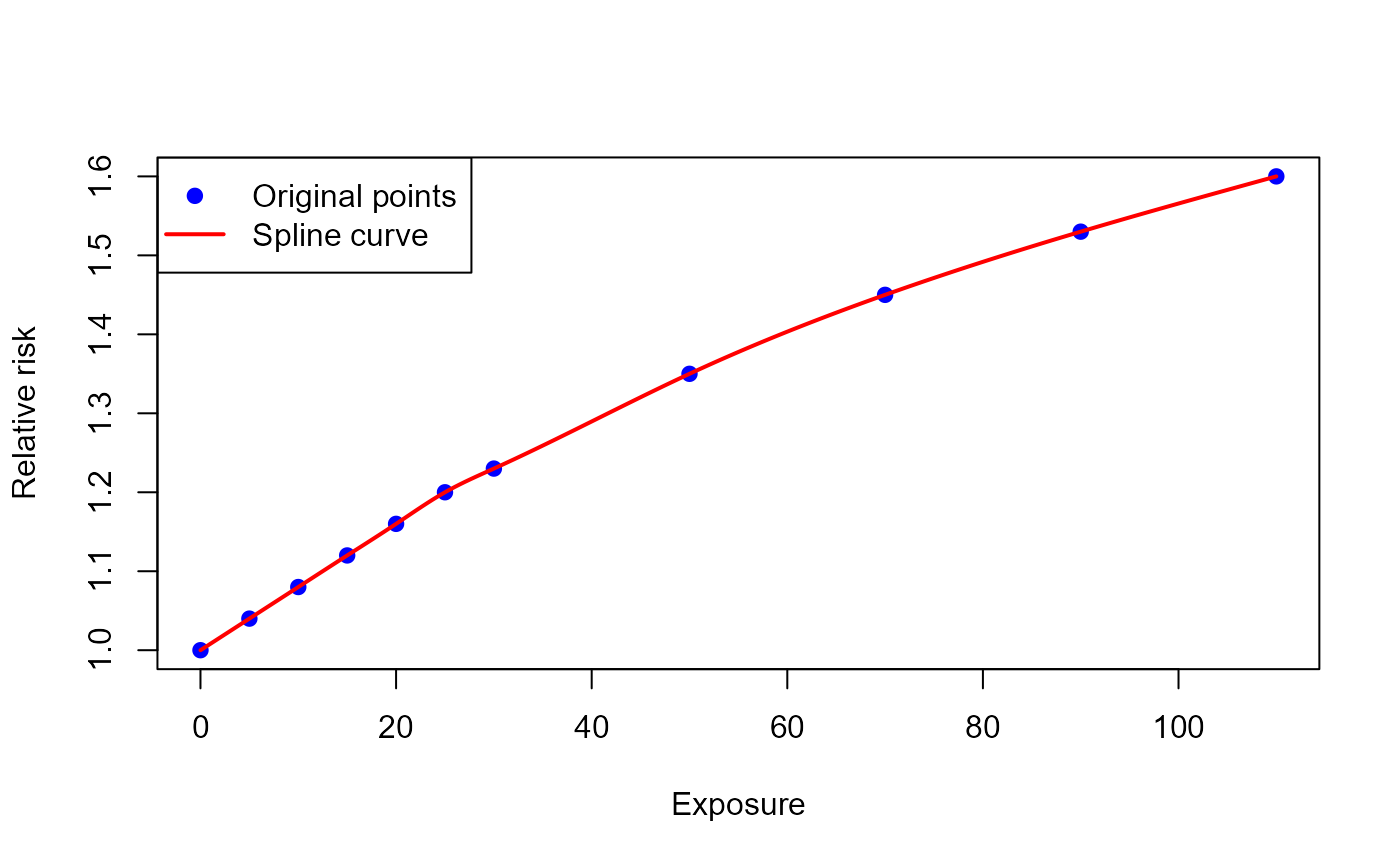
Alternatively, other functions (e.g. approxfun()) can be
used to create the ERF
Sub-group analysis
Every sub-group stratifies the assessment: by age group, by sex, or
by anything entered in info, such as education level. What
differs is what happens to that stratification in the main results.
For the sub-groups in this chapter the impacts are summed,
so the stratification disappears from health_main and only
the total per geographic unit is shown. It is still available in the
results_by_... tables of the detailed output, and that is
usually what you want: the total across education levels, or across age
groups, is a meaningful number.
Not every dimension of an assessment is a sub-group in this sense, though. A stratification splits one population into parts that add up to the whole, which is exactly why summing them is meaningful. Different exposure-outcome pairs do not: PM2.5 and mortality and NO2 and asthma cover the same whole population, so they are parallel analyses rather than parts of one. Adding them up counts the same people twice.
Those dimensions therefore have to be kept in the main
results, which is what the argument main_results_by does.
See the chapter Multiple exposure-outcome pairs.
by age group
Example
In the example below, we quantify the health impacts attributable to air pollution in two age groups (below 65 and 65+).
Function call
To obtain age-group-specific results, the baseline health data (and possibly exposure) must be available by age group.
If the age argument was specified, age-group-specific
results are available under health_detailed in the
sub-folder results_by_age_group.
results_age_group <- attribute_health(
        approach_risk = "relative_risk",
        age = c("below_65", "65_plus"),
        exp_central = c(8, 7),
        cutoff_central = c(5, 5),
        bhd_central = c(1000, 5000),
        rr_central = 1.06,
        rr_increment = 10,
        erf_shape = "log_linear"
)by sex
Example
In the example below, we quantify the health impacts attributable to air pollution in females and males.
Function call
The baseline health data (and possibly exposure) must be entered by sex.
results_sex <- attribute_health(
        approach_risk = "relative_risk",
        sex = c("female", "male"),
        exp_central = c(8, 8),
        cutoff_central = c(5, 5),
        bhd_central = c(1000, 1100),
        rr_central = 1.06,
        rr_increment = 10,
        erf_shape = "log_linear"
      )
Results by sex
If the sex argument was specified, sex-specific results
are available under health_detailed in the sub-folder
results_by_sex.
results_sex$health_detailed$results_by_sex |>
  dplyr::select(sex, impact_rounded, exp, bhd) |>
knitr::kable()| sex | impact_rounded | exp | bhd |
|---|---|---|---|
| female | 17 | 8 | 1000 |
| male | 19 | 8 | 1100 |
by other sub-groups
Example
In the example below, we quantify the health impacts attributable to air pollution by education level in four geographic units.
Function call
A single vector (or a data frame / tibble with multiple columns) to
group the results by can be entered to the info
argument.
In a second step one can group the results based on one or more columns and so summarize the results by the preferred sub-groups.
If the argument info is a data frame or tibble, the
columns in the info argument are renamed adding the prefix
info_. If the argument info is a vector, the
column in the results is called info.
output_attribute <- healthiar::attribute_health(
    rr_central = 1.063,
    rr_increment = 10,
    erf_shape = "log_linear",
    cutoff_central =  0,
    exp_central = c(6, 7, 8,
                    7, 8, 9,
                    8, 9, 10,
                    9, 10, 11),
    bhd_central = c(600, 700, 800,
                    700, 800, 900,
                    800, 900, 1000,
                    900, 1000, 1100),
    geo_id_micro = rep(c("a", "b", "c", "d"), each = 3),
    info = data.frame(
      education = rep(c("secondary", "bachelor", "master"), times = 4)) # education level
)by age, sex and other sub-groups
Goal
To quantify health impacts by several sub-groups at the same time, such as age, sex and education level.
Example
In the example below, we quantify the health impacts attributable to air pollution by age group, sex and education level in two geographic units.
Function call
output_attribute <- healthiar::attribute_health(
    rr_central = 1.063,
    rr_increment = 10,
    erf_shape = "log_linear",
    cutoff_central =  0,
    age_group = rep(c("50_and_younger", "50_plus"), each = 4, times= 2),
    sex = rep(c("female", "male"), each = 2, times = 4),
    exp_central = c(6, 7, 8, 7, 8, 9, 8, 9,
                    10, 9, 10, 11, 10, 11, 12, 13),
    bhd_central = c(600, 700, 800, 700, 800, 900, 800, 900,
                    1000, 900, 1000, 1100, 1000, 1100, 1200, 1000),
    geo_id_micro = rep(c("a", "b"), each = 8),
    info = data.frame(
      education = rep(c("without_master", "with_master"), times = 8)) # education level
)Multiple exposure-outcome pairs
Goal
To quantify the health impacts of several exposure-outcome pairs, or of the same pair with different relative risks, in one single function call.
Methods
As explained in the chapter Sub-group analysis, the impacts
of the sub-groups are summed by default, so only the total per
geographic unit is shown in health_main.
That is not what you want here. Premature deaths attributable to PM2.5 and asthma cases attributable to NO2 are not two parts of one population: they are two analyses of the same population, so adding them up counts the same people twice. The same applies to a sensitivity analysis in which one pair is quantified with the relative risks of two different studies: the two results are alternatives to each other, not summands.
Enter therefore in main_results_by the names of the
dimensions that the main results have to be reported by. They stay as
separate rows in health_main and in all
results_by_... tables. Note that
main_results_by does not create those tables, which are
available in the detailed output in any case: it determines which
dimensions survive in them and in the main results.
Example 1: several exposure-outcome pairs
In the example below, we quantify the COPD cases attributable to PM2.5 and the asthma cases attributable to NO2 in two geographic units.
Function call
The pairs are identified in a column of info, and that
column is named in main_results_by. All other arguments are
entered as parallel vectors, exactly as for multiple geographic units.
Note that the pairs can have different exposure-response functions, here
log-linear for PM2.5 and linear for NO2.
output_attribute <- healthiar::attribute_health(
    info = data.frame(
      pair = rep(c("pm2.5_copd", "no2_asthma"), each = 2)),
    main_results_by = "pair",
    exp_central    = c(8.85, 9.20, 22.1, 24.5),
    cutoff_central = c(5, 5, 10, 10),
    rr_central     = c(1.369, 1.369, 1.041, 1.041),
    rr_increment   = 10,
    erf_shape      = c("log_linear", "log_linear", "linear", "linear"),
    bhd_central    = c(30747, 31500, 12000, 12500),
    geo_id_micro   = rep(c("a", "b"), times = 2)
  )
Main results
One row per exposure-outcome pair and geographic unit. Without
main_results_by the four impacts would have been added up
into one single number per geographic unit.
output_attribute$health_main |>
  dplyr::select(info_pair, geo_id_micro, erf_ci, impact_rounded) |>
  print()
#> # A tibble: 4 × 4
#>   info_pair  geo_id_micro erf_ci  impact_rounded
#>   <chr>      <chr>        <chr>            <dbl>
#> 1 pm2.5_copd a            central           3502
#> 2 pm2.5_copd b            central           3893
#> 3 no2_asthma a            central            567
#> 4 no2_asthma b            central            701
Example 2: sensitivity analysis with several exposure-response functions
The same mechanism compares one exposure-outcome pair quantified with the relative risks of two different studies.
Function call
output_sensitivity <- healthiar::attribute_health(
    info = data.frame(rr_source = c("Liu 2020", "WHO 2021")),
    main_results_by = "rr_source",
    exp_central = c(8.85, 8.85),
    cutoff_central = 5,
    rr_central = c(1.369, 1.080),
    rr_increment = 10,
    erf_shape = "log_linear",
    bhd_central = c(30747, 30747)
)Notes
Which dimensions can be entered
main_results_by is available in both
attribute_health() and attribute_lifetable().
It accepts:
- the columns of
info, using the names that you gave them (e.g."pair"), or"info"itself if you entered a vector instead of a data frame; - the arguments
sex,age_group,exp_category,geo_id_microandgeo_id_macro; - in
attribute_lifetable()alsoyear, i.e. the years of the time horizon, which are otherwise added up.
For example, main_results_by = "sex" shows one row per
sex in health_main instead of the total across sexes. This
changes nothing in the calculation, only which rows are kept apart in
the results, and the rows still add up to the total that you would get
without the argument.
A name that is not available in the assessment produces an error
listing the options, so a typo in a column name of info
cannot pass unnoticed.
Limitations
All pairs in one call must use the same way of defining the
exposure-response function, i.e. either rr_... or
erf_eq_... for all of them, and the same
approach_risk.
standardize() keeps the pairs apart as well, so each
pair gets its own age-standardized impacts. Nothing has to be done for
that: its results simply carry the columns of
main_results_by.
socialize() and summarize_uncertainty()
analyse one pair at a time and stop with an error otherwise, so for them
attribute_health() has to be called once per pair. The
reason is different in each case. socialize() groups the
impacts only by geographic unit, age group and social quantile, and its
arguments have no way of identifying the pairs when the input is entered
directly instead of as an attribute_health() output.
summarize_uncertainty() simulates one value per variable
and geographic unit, assuming that e.g. the relative risk is the same
everywhere, which is not the case when each pair has its own.
YLL & deaths with life table
The life table approach of attribute_lifetable() is only
applicable to all-cause mortality. The baseline deaths
(bhd_central) are used for two purposes at the same time:
to project how the population survives over the years and to obtain the
deaths that are attributable to the exposure. The projection of the
population needs the deaths of all causes, so bhd_central
must contain all-cause deaths and the exposure-response function must
refer to all-cause mortality.
Cause-specific mortality (e.g. lung cancer) cannot be assessed with
attribute_lifetable():
- If only the cause-specific deaths are entered, the projected population hardly dies of any other cause and reaches unrealistically high ages. The YLL and the attributable deaths are then overestimated.
- If all-cause deaths are entered with a cause-specific exposure-response function, the relative risk is applied to all causes of death, which overestimates the impacts as well.
For cause-specific mortality, the attributable deaths can be obtained
with attribute_health().
Data preparation
Goal
To convert population and death data by larger age groups into the one-year age groups required by the life table approach.
Methods
The life table approach to obtain YLL and deaths requires population and baseline mortality data to be stratified by one year age groups. However, in some cases these data are only available for larger age groups (e.g., 5-year data: 0-4 years old, 5-9 years old, …). What to do?
If your population and mortality data are not available by one-year age group, data must be prepared by interpolating values. The healthiar function
prepare_lifetable()makes this conversion using the same approach as the WHO tool AirQ+ (WHO 2020). In standard AirQ+ life table disaggregations, deaths are assumed to be distributed uniformly across age intervals with a fraction of the age interval lived of 0.5. The argumentfraction_livedallows other assumptions, see the section on the fraction of the age interval lived below.If your population and death data are stratified by one-year age group, you are lucky, you can ignore this initial step.
prepare_lifetable()passes single-year data on unchanged, so it can also be used for a life table that mixes already available single-year data with converted larger age groups.
Fraction of the age interval lived
The argument fraction_lived, available in both
prepare_lifetable() and attribute_lifetable(),
is the average fraction of an age interval that is lived by those who
die in it. It corresponds to
in the life table literature (Chiang 1984;
Preston et al. 2001). The default of 0.5 for all age groups means
that deaths are evenly distributed over the age interval, which is the
value that AirQ+ assumes (WHO 2020). It
can be entered as a single value applying to all age groups or as one
value per age group.
What it determines
With the death rate of an age interval of width , the probability of dying in that interval is
and the person-years lived at a single year of age, i.e. its mid-year population, is one year for each person reaching the next birthday plus years for each person dying at that age:
In prepare_lifetable() these two relations fix the
conversion. The entry population of the first single year of age of an
age group follows from the condition that the conversion may neither
create nor lose population, i.e. that the single-year mid-year
populations have to add up to the mid-year population of the age group
that was entered:
For
this reproduces the values published in the AirQ+ manual, and unlike the
formula given there it holds for any age interval width and any value of
fraction_lived.
Both relations are checked in internal tests in healthiar
against a published life table, the abridged life table for Austrian
males in 1992 (Preston et al. 2001), in
which the fraction of the age interval lived ranges from 0.48 to 0.63 in
the 5-year age groups and is 0.068 at age 0. Applying the probability of
dying obtained by prepare_lifetable() to the published
survivors reproduces the published deaths of that life table for every
age group, and the entry population it determines from the published
mid-year population and deaths at age 0 reproduces the published number
of survivors.
What it does not determine
fraction_lived is not a way to control how the
deaths of an age group are distributed over the single years of age it
contains. That distribution follows from the survival probabilities, as
in AirQ+, so fraction_lived influences it only indirectly
and far too weakly to be used for it. Both quantities are distinct in
the life table literature and the distribution of the deaths cannot be
derived from
(Preston et al. 2001).
prepare_lifetable() can therefore not reproduce the
concentration of deaths at age 0 that is observed in low-mortality
settings. If the deaths at age 0 matter for your assessment, obtain
single-year population and death data for the youngest ages instead of
relying on the conversion.
How to choose it
The sensitivity of the survival probability to
fraction_lived is
i.e. it grows with the square of the hazard rate.
fraction_lived therefore matters little in the age groups
with a low mortality and most in those with the highest mortality, which
are the last ones. With the example data of this vignette, entering 0.1
for age 0 changes the YLL by 0.01%, whereas adapting the last age group
changes them by 0.25%.
Values of other than 0.5 are usually derived from the mortality level itself. For age 0 and for the ages 1 to 4, Preston et al. (2001) report rules of thumb going back to Coale and Demeny, e.g. for males with . For an open-ended last age group, is the remaining life expectancy , which can exceed the width of the age interval.
Whichever fraction_lived is used in
prepare_lifetable() has to be passed on to
attribute_lifetable(), which needs the same assumption to
obtain the survival probabilities. The output column
fraction_lived_for_attribute is provided for that
purpose.
Example
In the example below, we convert the population and deaths of four 5-year age groups into one-year age groups, once with the default and once with an age-specific fraction of the age interval lived.
Function call
age_groups <- c(0, 5, 10, 15)
pop <- c(438200, 445100, 439800, 421500)
bhd_counts <- c(1420, 45, 50, 125)

# Standard uniform disaggregation (fraction_lived = 0.5)
prepared_data <- healthiar::prepare_lifetable(
  age_group = age_groups,
  population = pop,
  bhd = bhd_counts
  # fraction_lived = 0.5 (default)
)

# Age-group specific fraction of the age interval lived (first fraction_lived = 0.1)
prepared_data_with_age_specific_fraction_lived <- healthiar::prepare_lifetable(
  age_group = age_groups,
  population = pop,
  bhd = bhd_counts,
  fraction_lived = c(0.1, 0.5, 0.5, 0.5)
)
YLL
Methods
General concept
The life table methodology of attribute_lifetable()
follows that of the WHO tool AirQ+ (WHO
2020), which is described in more detail by Miller and Hurley (2003). The generalized
formulas, which do not assume a fixed fraction of life lived
(fraction_lived = 0.5), are based on the foundational work by Chiang (1984). In short, two scenarios are
compared:
a scenario with the exposure level specified in the function (“exposed scenario”) and
a scenario with no exposure (“unexposed scenario”).
First, the entry and mid-year populations of the (first) year of analysis in the unexposed scenario are determined using modified survival probabilities. Second, age-specific population projections using scenario-specific survival probabilities are done for both scenarios. Third, by subtracting the populations in the unexposed scenario from the populations in the exposed scenario the premature deaths/years of life lost attributable to the exposure are determined. An extensive life table case study is available in a report by Miller (2010).
Use the two arguments approach_exposure and
approach_newborns to modify the life table calculation:
-
approach_exposure"single_year"(default): Population is exposed for only one year (year of analysis). Applicable for both deaths and YLL. The attributable deaths refer to the year of analysis only, while the YLL caused by the exposure in that year are accumulated across the year of analysis and the following years (see argumenttime_horizon)."constant": Population is exposed every year, i.e. air pollution exposure is sustained across the full projection horizon and attributable health impacts are projected and cumulated across the full lifetime period (see argumenttime_horizon). Applicable for both deaths and YLL.
Both options give the same attributable deaths and YLL in the year of analysis, because they only differ from the following year on. By default, AirQ+ assumes that air pollution remains stable over time (WHO 2020): its results over several years (e.g. “YLL over 10 years”) correspond to
"constant", while the attributable deaths that it reports for the first year are the same with both options. A single-year exposure can only be obtained in AirQ+ with its advanced scenario “Change in pollution level” (WHO 2020), set to reduce the pollution level by 100% in the years after the year of analysis. -
approach_newborns"without_newborns"(default): Population in the year of analysis is followed over time, without considering newborns being born."with_newborns": For each year after the year of analysis n babies are born, with n being equal to the (male and female) population aged 0 that is provided in the argument population.
Last age group
The life table is closed at the last age group, i.e. the survivors of the last age group are not projected into a further age. This follows the usual practice in the life table method, which extends the life table up to an age past which the probability of survival is negligible and then sets the survival above it to zero (Miller and Hurley 2003).
The data must therefore reach an age at which survival is negligible, i.e. the last age group should be one in which essentially all remaining deaths occur. National life tables usually already close in this way, with a probability of dying of 1 in the last age group. If the last age group still has an appreciable number of survivors, those survivors are dropped from the projection: neither the life years they would still live, nor the difference in those life years between the exposed and the unexposed scenario, are counted. The attributable health impacts are then underestimated. With the example data used in this vignette, which end at age 99 and still have a survival probability of about 0.34 there, the underestimation is around 0.7%.
If that is the case, condense the last age group, i.e. sum the populations and the deaths of the highest ages into it, so that all remaining deaths fall within it. Do not add extra age groups beyond the data instead: the added ages would need a population greater than 0, that population would be considered exposed and would generate attributable health impacts of its own, and the results would then grow with the number of added age groups instead of converging.
Comparison with AirQ+
healthiar aligns with AirQ+ in the equations of the life
table. The survival probability of AirQ+,
,
is identical to the one used here with the default
fraction_lived = 0.5, and the modified survival probability
is obtained in both tools by dividing the hazard rate by the relative
risk (which is equivalent to multiplying it by
)
(WHO 2020).
healthiar reproduces the results of AirQ+. For the same input data, the attributable YLL and premature deaths of both tools agree to the last decimal that AirQ+ prints, for an exposure of one single year as well as for a constant exposure, year by year and accumulated over several years, and so do the life expectancies with and without the exposure.
The comparison has to be made by sex, though, because the “All
genders” results of AirQ+ are not the sum of its male and female results
as in healthiar: AirQ+ obtains them from a life table in which
the populations and the deaths of both sexes are pooled, which has to be
entered and run separately (WHO 2020).
With the data of the example below, the pooled life table for all
genders in AirQ+ gives 1.6% more YLL than the sum of two sex-specific
ones in healthiar. healthiar returns that pooled value
too, when the populations and the deaths of both sexes are entered as
one single life table, i.e. passing the same value in sex
for every age group.
Determination of populations in the (first) year of analysis
Entry population
The entry (i.e. start of year) populations in both scenarios (exposed and unexposed) is determined as follows:
Survival probabilities
Exposed scenario
The survival probabilities in the exposed scenario from start of year to start of year are calculated as follows:
Analogously, the probability of survival from start of year to mid-year :
Unexposed scenario
The survival probabilities in the unexposed scenario are calculated as follows:
First, the age-group specific hazard rate in the exposed scenario is calculated using the inputted age-specific mid-year populations and deaths.
Second, the hazard rate is multiplied by the modification factor () to obtain the age-specific hazard rate in the unexposed scenario.
Third, the age-specific survival probabilities (from the start until the end in a given age group) in the unexposed scenario are calculated as follows:
Mid-year population
The mid-year population of the (first) year of analysis (year_1) in the unexposed scenario are determined as follows:
First, the survival probabilities from start of year to mid-year in the unexposed scenario is calculated as:
Second, the mid-year populations of the (first) year of analysis (year_1) in the unexposed scenario is calculated:
Population projection
Using the age group-specific and scenario-specific survival probabilities calculated above, future populations of each age-group under each scenario are calculated.
Exposed scenario
The population projections for the two possible options of
approach_exposure ("single_year" and
"constant") for the exposed scenario are different. In the
case of "single_year" exposure, the population projection
for the years after the year of exposure uses the same (modified)
survival probabilities as the unexposed scenario.
In the case of "constant" the population projection is
done as follows:
First, the entry population of year is calculated (which is the same as the end of year population of year ) using the entry population of year .
Second, the mid-year population of year is calculated.
Unexposed scenario
The entry and mid-year population projections in the unexposed scenario are done as follows:
First, the entry population of year is calculated (which is the same as the end of year population of year ) by multiplying the entry population of year and the modified survival probabilities.
Second, the mid-year population of year is calculated.
Example
In the example below, we quantify the YLL from all-cause mortality
attributable to PM2.5 exposure, using the example life table
exdat_lifetable.
Function call
results_pm_yll <- attribute_lifetable(
  year_of_analysis = 2019,
  health_outcome = "yll",
  rr_central =  1.118,
  rr_increment = 10,
  erf_shape = "log_linear",
  exp_central = 8.85,
  cutoff_central = 5,
  min_age = 20, # age from which population is affected by the exposure
  # Life table information
  age_group = exdat_lifetable$age_group,
  sex = exdat_lifetable$sex,
  population = exdat_lifetable$midyear_population,
  # In the life table case, BHD refers to deaths
  bhd_central = exdat_lifetable$deaths
)
Main results
Total YLL attributable to exposure (sum of sex-specific impacts).
results_pm_yll$health_main| impact_rounded | erf_ci | exp_ci | bhd_ci |
|---|---|---|---|
| 28810 | central | central | central |
Detailed results
Attributable YLL results
per year
per age (group)
per sex (if sex-specific life table data entered)
are available.
Below, the results per age and the population projections are shown for females; the results for males are also available.
YLL per year
Only a selection of years is shown.
results_pm_yll$health_detailed$results_raw |>
  dplyr::summarize(
    .by = year,
    impact = sum(impact, na.rm = TRUE)
)| year | impact |
|---|---|
| 2019 | 1299.683 |
| 2020 | 2421.604 |
| 2021 | 2221.148 |
| 2022 | 2032.978 |
| 2023 | 1857.582 |
| 2024 | 1694.959 |
| 2025 | 1545.430 |
| 2026 | 1408.650 |
| 2027 | 1284.054 |
| 2028 | 1170.668 |
YLL per age
results_pm_yll$health_detailed$intermediate_calculations |>
  dplyr::filter(sex == "female") |>
  dplyr::pull(impact_by_age_and_year) |>
purrr::pluck(1)| age_start | age_end | impact_2019 |
|---|---|---|
| 91 | 92 | 29.480668 |
| 92 | 93 | 27.542091 |
| 93 | 94 | 25.166285 |
| 94 | 95 | 22.111703 |
| 95 | 96 | 18.514777 |
| 96 | 97 | 14.505077 |
| 97 | 98 | 11.222461 |
| 98 | 99 | 8.170093 |
| 99 | 100 | 31.772534 |
Population (exposed scenario)
The exposed scenario is the scenario with the exposure specified in the assessment.
results_pm_yll$health_detailed$intermediate_calculations|>
  dplyr::filter(sex == "female") |>
  dplyr::pull(projection_if_exposed_by_age_and_year) |>
purrr::pluck(1)| age_start | midyear_population_2019 | midyear_population_2020 | midyear_population_2021 | midyear_population_2022 |
|---|---|---|---|---|
| 91 | 10560 | 10980.4178 | 11536.8448 | 11815.045 |
| 92 | 8728 | 9105.4297 | 9498.3206 | 9979.643 |
| 93 | 7140 | 7377.6106 | 7725.1173 | 8058.449 |
| 94 | 5655 | 5910.7546 | 6133.2128 | 6422.105 |
| 95 | 4332 | 4582.9334 | 4813.1037 | 4994.250 |
| 96 | 3118 | 3436.4582 | 3654.9171 | 3838.479 |
| 97 | 2234 | 2419.2261 | 2682.1499 | 2852.657 |
| 98 | 1520 | 1695.7730 | 1848.4164 | 2049.304 |
| 99 | 2246 | 879.8714 | 988.6583 | 1077.651 |
Population (unexposed scenario)
The unexposed scenario is the scenario without exposure.
results_pm_yll$health_detailed$intermediate_calculations|>
  dplyr::filter(sex == "female") |>
  dplyr::pull(projection_if_unexposed_by_age_and_year) |>
purrr::pluck(1)| age_start | midyear_population_2019 | midyear_population_2020 | midyear_population_2021 | midyear_population_2022 |
|---|---|---|---|---|
| 91 | 10589.481 | 11037.9003 | 11589.268 | 11861.323 |
| 92 | 8755.542 | 9160.1507 | 9548.044 | 10024.990 |
| 93 | 7165.166 | 7428.2700 | 7771.543 | 8100.635 |
| 94 | 5677.112 | 5956.6019 | 6175.327 | 6460.700 |
| 95 | 4350.515 | 4622.8492 | 4850.437 | 5028.544 |
| 96 | 3132.505 | 3469.5619 | 3686.750 | 3868.253 |
| 97 | 2245.222 | 2444.9150 | 2707.987 | 2877.502 |
| 98 | 1528.170 | 1715.4685 | 1868.044 | 2069.045 |
| 99 | 2277.773 | 890.9436 | 1000.141 | 1089.095 |
Deaths
Example
In the example below, we quantify the all-cause premature deaths attributable to PM2.5 exposure, using the same life table as for YLL.
Function call
See example on YLL for additional info on
attribute_lifetable() calculations and its output.
results_pm_deaths <- attribute_lifetable(
  health_outcome = "deaths",
  year_of_analysis = 2019,
  rr_central =  1.118,
  rr_increment = 10,
  erf_shape = "log_linear",
  exp_central = 8.85,
  cutoff_central = 5,
  min_age = 20, # age from which population is affected by the exposure
  # Life table information
  age_group = exdat_lifetable$age_group,
  sex = exdat_lifetable$sex,
  population = exdat_lifetable$midyear_population,
  bhd_central = exdat_lifetable$deaths
)
Main results
Total premature deaths attributable to exposure (sum of sex-specific impacts).
results_pm_deaths$health_main$impact| impact_rounded | erf_ci | exp_ci | bhd_ci |
|---|---|---|---|
| 2599 | central | central | central |
Detailed results
Attributable premature deaths results
per year (if argument
approach_exposure = "constant")per age (group)
per sex (if sex-specific life table data entered)
are available.
Below, the results for females are shown; the results for males are also available.
Because the function argument approach_exposure is not
specified in this example, the default
approach_exposure = "single_year" is used and the premature
deaths refer to one year (the year of analysis). If you set
approach_exposure = "constant", results are projected and
accumulated across the full time horizon.
results_pm_deaths$health_detailed$intermediate_calculations|>
  dplyr::filter(sex == "female") |>
  dplyr::pull(projection_if_unexposed_by_age_and_year) |>
purrr::pluck(1)| yoa | age_group | age_start | age_end | bhd | deaths | population | fraction_lived | modification_factor | prob_survival | prob_survival_until_midyear | hazard_rate | is_exposed_age | prob_survival_mod | prob_survival_until_midyear_mod | hazard_rate_mod | midyear_population_yoa | entry_population_yoa | end_population_yoa | deaths_yoa | entry_population_yoa_plus_1 |
|---|---|---|---|---|---|---|---|---|---|---|---|---|---|---|---|---|---|---|---|---|
| 2019 | 91 | 91 | 92 | 1498 | 1498 | 10560 | 0.5 | 0.9579656 | 0.8675391 | 0.9337696 | 0.1418561 | TRUE | 0.8727528 | 0.9363764 | 0.1358932 | 10589.481 | 11309.0 | 9869.961 | 1439.0387 | 11787.888 |
| 2019 | 92 | 92 | 93 | 1412 | 1412 | 8728 | 0.5 | 0.9579656 | 0.8503286 | 0.9251643 | 0.1617782 | TRUE | 0.8561675 | 0.9280837 | 0.1549779 | 8755.542 | 9434.0 | 8077.084 | 1356.9158 | 9869.961 |
| 2019 | 93 | 93 | 94 | 1302 | 1302 | 7140 | 0.5 | 0.9579656 | 0.8328841 | 0.9164420 | 0.1823529 | TRUE | 0.8393444 | 0.9196722 | 0.1746878 | 7165.166 | 7791.0 | 6539.333 | 1251.6674 | 8077.084 |
| 2019 | 94 | 94 | 95 | 1155 | 1155 | 5655 | 0.5 | 0.9579656 | 0.8146811 | 0.9073406 | 0.2042440 | TRUE | 0.8217767 | 0.9108884 | 0.1956588 | 5677.112 | 6232.5 | 5121.723 | 1110.7766 | 6539.333 |
| 2019 | 95 | 95 | 96 | 976 | 976 | 4332 | 0.5 | 0.9579656 | 0.7975104 | 0.8987552 | 0.2253001 | TRUE | 0.8051929 | 0.9025964 | 0.2158297 | 4350.515 | 4820.0 | 3881.030 | 938.9704 | 5121.723 |
| 2019 | 96 | 96 | 97 | 772 | 772 | 3118 | 0.5 | 0.9579656 | 0.7796804 | 0.8898402 | 0.2475946 | TRUE | 0.7879595 | 0.8939798 | 0.2371871 | 3132.505 | 3504.0 | 2761.010 | 742.9898 | 3881.030 |
| 2019 | 97 | 97 | 98 | 603 | 603 | 2234 | 0.5 | 0.9579656 | 0.7621771 | 0.8810885 | 0.2699194 | TRUE | 0.7710294 | 0.8855147 | 0.2585735 | 2245.222 | 2535.5 | 1954.945 | 580.5551 | 2761.010 |
| 2019 | 98 | 98 | 99 | 443 | 443 | 1520 | 0.5 | 0.9579656 | 0.7456216 | 0.8728108 | 0.2914474 | TRUE | 0.7550044 | 0.8775022 | 0.2791965 | 1528.170 | 1741.5 | 1314.840 | 426.6598 | 1954.945 |
| 2019 | 99 | 99 | 100 | 2231 | 2231 | 2246 | 0.5 | 0.9579656 | 0.3363082 | 0.6681541 | 0.9933215 | TRUE | 0.3552120 | 0.6776060 | 0.9515678 | 2277.773 | 3361.5 | 1194.045 | 2167.4549 | 1314.840 |
YLD
Methods
To quantify the YLDs, you can use a prevalence-based or an incidence-based approach (Kim et al. 2022).
Prevalence-based: Enter
1(year) in the argument(s)duration_...(default) and prevalence cases inbhd_....Incidence-based: Enter the duration of the disease in years (value above 1) in
duration_...and incidence cases inbhd_....
In both approaches, enter the disability weight (between 0 and 1) in
dw_....
Example
In the example below, we quantify the YLD attributable to PM2.5 exposure for a disease with 1,000 incidence cases, a duration of 10 years and a disability weight of 0.2.
Function call
results_pm_copd_yld  <- attribute_health(
  rr_central = 1.1,
  rr_increment = 10,
  erf_shape = "log_linear",
  exp_central = 8.85,
  cutoff_central = 5,
  bhd_central = 1000,
  duration_central = 10,
  dw_central = 0.2
)DALY
Goal
To quantify the disability-adjusted life years (DALY) attributable to an exposure as the sum of YLL and YLD.
Methods
To obtain the attributable DALY, its two components, i.e. years of life lost (YLL) and years lived with disability (YLD), must be summed (GBD 2019 Risk Factors Collaborators 2020).
Example 1: DALY of one scenario
In the example below, we add up the YLL and the YLD from the previous
chapters, using the function daly().
Function call
results_daly <- daly(
     output_attribute_yll = results_pm_yll,
     output_attribute_yld = results_pm_copd_yld
)
Main results
YLL, YLD & DALY
results_daly$health_main |>
dplyr::select(impact_yll_rounded, impact_yld_rounded, impact_rounded)| impact_yll_rounded | impact_yld_rounded | impact_rounded |
|---|---|---|
| 28810 | 72 | 28882 |
Example 2: DALY difference between two scenarios
daly() also accepts the outputs of
compare() (see chapter Comparison of two health
scenarios). Compare first the YLL and the YLD of the two scenarios
separately and then enter both comparisons in daly() to
obtain the difference in DALY between the scenarios.
Function call
results_daly_comparison <- daly(
  output_attribute_yll = comparison_yll, # compare() output with YLL
  output_attribute_yld = comparison_yld  # compare() output with YLD
)
Modification of scenarios
Goal
To create a new scenario that differs from an existing assessment only in some input data, without entering all input data again.
Example
In the example below, we change the exposure of an existing assessment from 8.85 to 6 .
Function call
scenario_A <- attribute_health(
    exp_central = 8.85,   # EXPOSURE 1
    cutoff_central = 5,
    bhd_central = 25000,
    approach_risk = "relative_risk",
    erf_shape = "log_linear",
    rr_central = 1.118,
    rr_increment = 10)
The function attribute_mod() can be used to modify one
or multiple arguments of attribute_health() in an existing
scenario, e.g. scenario_A.
scenario_B <- attribute_mod(
  output_attribute = scenario_A,
  exp_central = 6
)
This is equivalent to building the whole scenario again (see below), but more time and code efficient.
scenario_B <- attribute_health(
    exp_central = 6,     # EXPOSURE 2
    cutoff_central = 5,
    bhd_central = 25000,
    approach_risk = "relative_risk",
    erf_shape = "log_linear",
    rr_central = 1.118,
    rr_increment = 10)
Comparison of two health scenarios
Goal
To quantify the difference in health impacts between two scenarios, e.g. before and after an intervention.
Methods
Two approaches can be used for the comparison of scenarios:
Delta: Subtraction of health impact in scenario 1 minus in scenario 2 (i.e. two PAF) (WHO Regional Office for Europe 2014)
Population impact fraction (PIF) (WHO 2003; C. J. L. Murray et al. 2003; Askari and Namayandeh 2020).
Note that the PIF comparison approach assumes same baseline health data for scenario 1 and 2 (e.g., comparison of two scenarios at the same time point), while the delta comparison approach, the difference between two scenarios is obtained by subtraction. Therefore, the delta approach is suited for comparison of scenarios in different time points.
Population Impact Fraction (PIF)
The Population Impact Fraction (PIF) is defined as the proportional change in disease or mortality when exposure to a risk factor is changed, for instance due to an intervention.
General Integral Form
The most general equation describing this mathematically is an integral form (WHO 2003; C. J. L. Murray et al. 2003):
Where:
- = exposure level
- = proportion of the population exposed at exposure level in scenario 1
- = proportion of the population exposed at exposure level in scenario 2 (alternative scenario)
- = relative risk at exposure level compared to the reference level
Categorical Exposure Form
If the population exposure is described as a categorical rather than continuous exposure, the integrals may be converted to sums (WHO 2003; C. J. L. Murray et al. 2003):
Where:
- = the exposure category (e.g., in bins of 1 or 5 dB noise exposure)
- = proportion of the population in exposure category in scenario 1
- = proportion of the population in exposure category in scenario 2 (alternative scenario)
- = relative risk for exposure category level compared to the reference level
Population weighted mean concentration form
Finally, if the exposure is provided as the population weighted mean concentration, the equation for the PIF is reduced to:
Where:
- = relative risk at the exposure level in scenario 1
- = relative risk at the exposure level in scenario 2 (alternative scenario)
Example
In the example below, we compare the health impacts of a PM2.5 exposure of 8.85 with those of 6 .
Function call
- Use
attribute_health()to calculate burden of scenarios A & B.
scenario_A <- attribute_health(
    exp_central = 8.85,   # EXPOSURE 1
    cutoff_central = 5,
    bhd_central = 25000,
    approach_risk = "relative_risk",
    erf_shape = "log_linear",
    rr_central = 1.118,
    rr_increment = 10)
scenario_B <- attribute_mod(
  output_attribute = scenario_A,
  exp_central = 6
)- Use
compare()to compare scenarios A & B.
results_comparison <- healthiar::compare(
  approach_comparison = "delta", # or "pif" (population impact fraction)
  output_attribute_scen_1 = scenario_A,
  output_attribute_scen_2 = scenario_B
)
The default value for the argument approach_comparison
is "delta". The alternative is "pif"
(population impact fraction). See the function documentation of
compare() for more details.
Main results
results_comparison$health_main| impact | impact_rounded | impact_scen_1 | impact_scen_2 | bhd | exp_category | exp_length | exp_type | exp_scen_1 | exp_scen_2 |
|---|---|---|---|---|---|---|---|---|---|
| 773.5564 | 774 | 1050.86 | 277.304 | 25000 | 1 | 1 | population_weighted_mean | 8.85 | 6 |
Detailed results
The compare() results contain two additional outputs in
addition to those we have already seen:
-
health_detailedscen_1contains results of scenario 1 (scenario A in our case)scen_2contains results of scenario 2 (scenario B in our case)
Notes
Important: If your aim is to quantify health impacts from a policy intervention, you should use the same year of analysis and therefore same health baseline data in both scenarios. The only variable that should change in the second scenario is the exposure (change as a result of the intervention).
Two correlated exposures
Methods
A methodological report of the EU project BEST-COST (Strak et al. 2024) identified three approaches to add up attributable health impacts from correlated exposures:
- Additive approach (Steenland and Armstrong 2006):
- Multiplicative approach (Jerrett et al. 2013):
- Combined approach (Steenland and Armstrong 2006):
Important: To apply any of these approaches, the relative risks for one exposure must be adjusted for the second exposure and vice versa.
Example
In the example below, we combine the impacts of PM2.5 and NO2 with
the multiplicative approach, using the function
multiexpose().
Function call
results_pm <- attribute_health(
  erf_shape = "log_linear",
  rr_central = 1.369,
  rr_increment = 10,
  exp_central = 8.85,
  cutoff_central = 5,
  bhd_central = 30747
)

results_no2 <- attribute_mod(
  output_attribute = results_pm,
  exp_central = 10.9,
  rr_central = 1.031
)

results_multiplicative <- multiexpose(
  output_attribute_exp_1 = results_pm,
  output_attribute_exp_2 = results_no2,
  exp_name_1 = "pm2.5",
  exp_name_2 = "no2",
  approach_multiexposure = "multiplicative"
)Standardization
Goal
To obtain age-standardized health impacts, which allow comparing populations with different age structures.
Methods
Age standardization involves adjusting the observed rates of a
particular outcome to a standard population with a specific age
structure. This is a technique used to allow the comparison of
populations with different age structures (GBD
2019 Demographics Collaborators 2020; Ahmad et al. 2001). In
healthiar, the function standardize() applies the
direct method, where the age-specific rates observed in a study
population are applied to a standard (reference) population
distribution.
The standardized health impact rate is computed as
where:
- is the age-standardized health impact rate.
- is the impact rate observed in age group (e.g., impact per 100,000 inhabitants).
- is the proportion of the reference population in age group .
- is the number of age groups.
Example
In the example below, we standardize the health impacts of two age groups (below and above 40) with a reference population split equally between them.
Function call
output_attribute <- attribute_health(
  rr_central = 1.063,
  rr_increment = 10,
  erf_shape = "log_linear",
  cutoff_central =  0,
  age_group = c("below_40", "above_40"),
  exp_central = c(8.1, 10.9),
  bhd_central = c(1000, 4000),
  population = c(100000, 500000)
  )

results <- standardize(
  output_attribute = output_attribute,
  age_group = c("below_40", "above_40"),
  ref_prop_pop = c(0.5, 0.5)
)Preparation of exposure data
Goal
To obtain the population-weighted mean exposure of geographic units from gridded concentration data and population data.
Methods
The healthiar function prepare_exposure() helps
users that do not have the exposure data (needed for healthiar
functions), but only spatial concentration and population data. The
function calculates an average concentration value in each geographic
unit, weighted with population at each location.
where:
- = population-weighted mean exposure for the geographic unit.
- = pollutant concentration in grid cell .
- = population count in grid cell .
- = total number of grid cells contained by the geographic unit.
In case population is entered as count by geographic sub-unit, the function calculates the mean concentration in each sub-unit and aggregates it to higher-level geographic units. If no population data is entered, the function calculates a simple spatial mean concentration as exposure value.
The output of prepare_exposure() can be entered in the
arguments exp_central, exp_lower and/or
exp_upper in healthiar functions such as
attribute_health().
Example
In the example below, we obtain the population-weighted mean PM2.5 exposure of neighbourhoods in Brussels (Belgium), aggregated by region.
Function call
# exdat_pwm_1 = Pollution grid data
exdat_pwm_1 <- terra::rast(system.file("extdata", "exdat_pwm_1.tif", package = "healthiar"))

# exdat_pwm_2 = Data with the geo units and population data. This is pre-loaded in healthiar.
# If your raw data are in .gpkg format, you can use e.g.  sf::st_read()

pwm <- healthiar::prepare_exposure(
  poll_grid = exdat_pwm_1, # Formal class SpatRaster,
  geo_units = exdat_pwm_2, # sf of the geographic sub-units
  population = sf::st_drop_geometry(exdat_pwm_2$population), # population per geographic sub-unit
  geo_id_macro = sf::st_drop_geometry(exdat_pwm_2$region)) # higher-level IDs to aggregate
Main results
Within the function output, the list exposure_main
contains the population-weighted mean exposures for the (higher-level)
geographic units in the column exposure_mean and the total
population in each unit in column population_total.
knitr::kable(as.data.frame(pwm$exposure_main))| geo_id_macro | exposure_mean | population_total |
|---|---|---|
| Center | 11.47271 | 203105 |
| East | 11.10716 | 187907 |
| North | 11.48670 | 257573 |
| South | 11.09940 | 308860 |
| West | 11.38849 | 298802 |
Cut-off vs. threshold
Goal
To quantify health impacts when the exposure data only cover exposures above a level (cut-off) that is higher than the effect threshold of the exposure-response function.
Methods
healthiar distinguishes two exposure levels:
-
thresholdis the effect threshold, i.e. the exposure level from which the exposure-response function starts to show an effect. It is the anchor of the curve and is therefore subtracted from the exposure. The term is used in this sense in health risk assessment guidance, e.g., for environmental noise (Engelmann et al. 2025). Because the risk is expressed relative to the threshold, the threshold is also the counterfactual exposure of the assessment, i.e. the exposure of the hypothetical scenario that the actual exposure is compared with (C. J. Murray et al. 2003). -
cutoff_...is the exposure level below which no health impacts are quantified. It determines which exposures are assessed, not the level that they are compared with. Usually, the cut-off is assumed to be the effect threshold, and then it is the counterfactual exposure as well. This is how the term is used in health risk assessment guidance, e.g., for air pollution (WHO 2025), where one single level plays both roles.
Accordingly, there are three possible combinations:
a) Cut-off equal to the effect threshold
This is the default situation. Since both threshold and cut-off are usually identical, healthiar assumes that the values are the same, if one of them is missing. Therefore, in that case, it is enough to enter only one value. The exposure-response function is anchored at that level, which is therefore subtracted from the exposure, and the exposures below it get the risk at the reference level:
The same result is obtained by entering only cutoff_...,
only threshold, or both with the same value.
b) Cut-off higher than the effect threshold
The exposure-response function is truncated at the cut-off. The exposures above the cut-off are assessed with the risk referring to the effect threshold, while the exposures below the cut-off get the risk at the reference level:
In the absolute risk approach, the exposures below the cut-off get an absolute risk of 0 instead of a relative risk of 1, i.e. in both approaches no health impacts are attributed to them.
This is the case, e.g., in noise assessments under the Environmental Noise Directive, in which exposure data are only reported above a given exposure level (cut-off) although the exposure-response functions show effects already at lower exposures (effect threshold). Be aware that this results in a step in the exposure-response function at the cut-off and that the people exposed between the effect threshold and the cut-off get no attributable health impacts (i.e. a conservative estimate).
c) Cut-off lower than the effect threshold
The cut-off has no effect on the results and healthiar shows
a warning. The reason is that the exposure-response function is anchored
at the effect threshold, so the exposures below the effect threshold
already get the risk at the reference level. A cut-off below the effect
threshold cannot remove any additional exposure and the results are the
same as if only threshold had been entered.
Example
In the example below (case b above), we quantify the health impacts in the noise exposure groups above 55 dB (cut-off) with an effect threshold of 45 dB.
Function call
results_cutoff_above_threshold <- healthiar::attribute_health(
  approach_risk = "relative_risk",
  erf_shape = "log_linear",
  rr_central = 1.055,
  rr_increment = 10,
  prop_pop_exp = c(300000,200000,150000,120000,100000,70000,60000)/10000000,
  exp_central = c(47,52,57,62,67,72,77),
  # Effect threshold, i.e. the anchor of the exposure-response function
  threshold = 45,
  # Cut-off, i.e. the exposures below it are not quantified
  cutoff_central = 55,
  bhd_central = 50000)$health_main$impact_rounded
Alternatively, the same result can be obtained by entering a
user-defined exposure-response function in erf_eq_... which
already includes the case distinction. This is only needed if the shape
of the curve above the cut-off is not covered by the
erf_shape options. The function arguments
erf_eq_... require a function as input. Instead of using a
splinefun() this can also be fulfilled by using a
‘function(c)’ which is of type ‘function’.
#setting up function parameters
threshold <- 45
RR <- 1.055
cutoff <- 55
rr_increment <- 10

# define categorical function, the ifelse condition enables the case distinction
erf_function <- function(c){
  output <- ifelse(c<cutoff, 1, exp((log(RR)/rr_increment)*(c-threshold)))
  return(output)
}
# attribute_health
results_catERF_different_cutoff <- healthiar::attribute_health(
  approach_risk = "relative_risk",
  erf_eq_central = erf_function,
  prop_pop_exp = c(300000,200000,150000,120000,100000,70000,60000)/10000000,
  exp_central = c(47,52,57,62,67,72,77),
  cutoff_central=0,
  bhd_central=50000)$health_main$impact_rounded
The categorical ERF curve created looks as follows. The step at the cut-off is clearly visible.
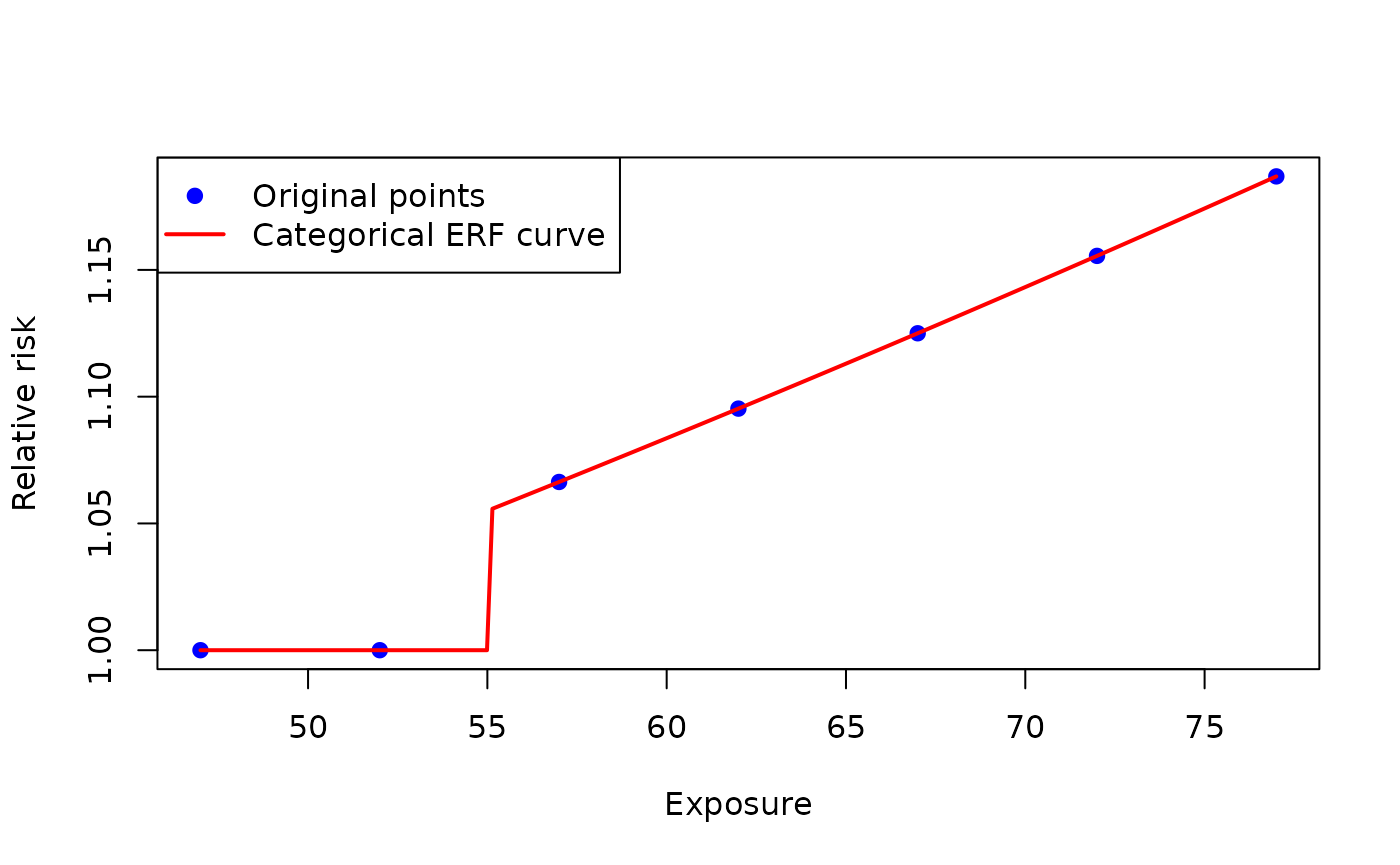
Shifting the ERF
Goal
To enter an exposure-response function in erf_eq_...
correctly, depending on whether it already incorporates the cut-off.
Methods
healthiar evaluates the exposure-response function entered
in erf_eq_... at
,
and the threshold takes the value of the cut-off if it is not entered
(see chapter Cut-off vs. threshold).
The cut-off therefore moves the exposure-response function horizontally.
There are two situations:
a) Unshifted exposure-response function
The function is parameterized on raw exposure levels, i.e. it already
incorporates the cut-off in its definition. Do not enter a
cutoff_... value, so that nothing is subtracted from the
exposure,
i.e. .
b) Shifted exposure-response function
The function is parameterized on the exposure above the cut-off,
i.e. it does not incorporate the cut-off. Enter a value in the
argument(s) cutoff_..., so that the function is moved
horizontally by the cut-off,
i.e. .
In case b), healthiar shows a warning when a
cutoff_... is entered alongside
approach_risk = "absolute_risk", because many
exposure-response functions published in the literature already
incorporate the cut-off in the function definition. The warning can be
ignored here.
Example
In the example below, the same absolute risk function is entered once unshifted and once shifted by a cut-off of 53 dB.
Function call
# Case A: Unshifted exposure-response function
# The function is parameterized on raw exposure levels
unshifted_erf <- healthiar::attribute_health(
  approach_risk = "absolute_risk",
  exp_central = c(50, 60, 70),
  pop_exp = c(300000,200000,150000),
  erf_eq_central = "78.9270 - 3.1162 * c + 0.0342 * c^2"
)

# Case B: Shifted exposure-response function
# The function is parameterized on the exposure above the cut-off
shifted_erf <- healthiar::attribute_health(
  approach_risk = "absolute_risk",
  exp_central = c(50, 60, 70),
  pop_exp = c(300000,200000,150000),
  cutoff_central = 53,
  erf_eq_central = "78.9270 - 3.1162 * (c + 53) + 0.0342 * (c + 53)^2"
)
#> Warning: You entered a value for: cutoff_central alongside absolute risk.
#> Be aware that healthiar shifts the exposure in 'erf_eq' as c = (exp - cutoff).
If you want the exposure-response function to stay unshifted but the
exposures below a given level not to be quantified, enter a
cutoff_... value higher than the threshold
(see chapter Cut-off
vs. threshold).
Economic dimension
Monetization
Goal
To express attributable health impacts in monetary terms, optionally with discounting, inflation and growth in valuation.
Methods
In health economic evaluations and economic burden of disease
assessments, health impacts may need to be converted into monetary
values. For this purpose, you can use monetize().
Several valuation metrics are available, depending on how outcomes are quantified in natural or health units (e.g. cases reduced, deaths prevented, reductions in mortality risk, life-years gained, QALYs gained, DALYs averted). Common metrics include the Value of a Statistical Life (VSL) (OECD 2025), the Value of a Life-Year (VOLY) (Hammitt 2007) and the Value of a Quality-Adjusted Life-Year (VAQALY) (Bobinac et al. 2010).
Discounting is the practice of converting future costs (or health impacts as previous step to valuating them) into their present value. The underlying rationale is that the value placed on outcomes declines as they occur further in the future. Therefore, future costs and effects are converted into present-value terms to make them comparable over time (Attema et al. 2018).
Discounting is implemented by selecting a discount rate, which is used to compute a discount factor for each time period. This factor is then multiplied by the corresponding future cost (or effect) to express it in present-value terms.
If you need the discounted values of a cost or health outcome, you
can call the healthiar function discount(). If you
just need the discount factor, you can alternatively call
get_discount_factor(). If you just need the inflation
factor, you can call get_inflation_factor(), or the
deflation factor by entering is_deflation = TRUE in the
same function.
Different functional forms can be used to apply discounting. The most common is exponential discounting, also referred to as constant discounting, since outcomes are discounted proportionally as time increases. An alternative is hyperbolic discounting, which tends to better capture human behavior by discounting the near present more heavily than outcomes further in the future (Lipman and Attema 2024)
See below the equations that are used behind these functions.
The arguments discount_factor, deflator_factor
and real_growth_factor are only used if a value is entered
in the arguments discount_rate, inflation_rate
and real_growth_rate respectively
(otherwise ignored).
Discount factor
Exponential discounting
As suggested by Frederick et al. (2002)
Hyperbolic discounting Harvey
As suggested by Harvey (1986)
Hyperbolic discounting Mazur
As suggested by Mazur (1987)
Deflation factor
Inflation can be handled in monetize() by applying a
deflator on future values, projected in nominal terms, in order to
convert them into real values (i.e., express these values in terms of
constant prices of a single base year). Therefore, if the user of the
function provides a value for the inflation_rate argument,
a deflator factor (HM Treasury 2022; Brealey et
al. 2023; Samuelson 1937) is applied according to the following
formulas
The formula above assumes that inflation is constant over time.
Because inflation usually varies from year to year,
inflation_rate also accepts a vector of year-specific rates
(at least as many values as years to be considered, the first value
referring to the first year after the present). In that case, the
deflator factor is calculated as the product of the year-specific
factors
Real valuation growth
If a rising societal value of health over time is required in the monetization, unlike inflation, this represents a “real” increase in value. Thus, as societies become wealthier, their willingness to pay to avoid mortality and morbidity risks tends to rise (OECD 2012).
For this use case, you have to enter a value in the argument
real_growth_rate in monetize(), which allows
you to project this growth by applying a valuation growth factor to
base-year unit values:
Where
represents the annual real growth rate in health valuation. As in
inflation_rate, a vector of year-specific rates can be
entered instead of one single value, in which case the factor is the
product of the year-specific factors. This ensures that long-term
environmental impacts are not undervalued.
Example 1: output of attribute_health()
In the example below, we monetize the COPD cases from the chapter Confidence interval with a value of 50,000 EUR per case, discounted at 3% over 5 years.
Function call
monetized_pm_copd <- monetize(
    output_attribute = results_pm_copd,
    discount_shape = "exponential",
    discount_rate = 0.03,
    n_years = 5,
    valuation = 50000 # E.g. EURO
)
Main results
The outcome of the monetization is added to the variable entered to
the output_attribute argument, which is
results_pm_copd in our case.
Two folders are added:
monetization_maincontains the central monetization estimate and the corresponding 95% confidence intervals obtained through the specified monetization.monetization_detailedcontains the monetized results for each unique combination of the input variable estimates that were provided to the initialattribute_health()call.
monetized_pm_copd$monetization_main| erf_ci | monetized_impact |
|---|---|
| central | 151041153 |
| lower | 58358321 |
| upper | 236091201 |
We see that the central estimate of the monetized impact (discounted) is about 151 million EURO.
Example 2: impacts from other sources
Alternatively, you can also monetize (attributable) health impacts from a non-healthiar source.
Function call
results <- monetize(
  impact = 1151,
  valuation = 100
)
Cost-benefit analysis
Methods
The CBA is a type of economic evaluation that compares the costs and the benefits of an intervention, considering both measures expressed in monetary terms.
To perform a CBA, you can use the function cba(). This
approach requires monetizing benefits so they can be directly compared
with costs. Since interventions typically generate costs and benefits
over multi-year time horizons, discounting is a common practice to
obtain the present value of future costs and benefits. Depending on the
reference guidelines, the discount rate can be specified as the same for
costs and benefits or different across them. The outputs of a
Cost-Benefit Analysis can be expressed as three main indicators (Boardman et al. 2018): - intervention’s net
benefit: the difference between monetized benefits and costs -
Cost-Benefit Ratio (CBR): monetized benefits divided by costs and -
Return on Investment (ROI): return generated per unit of expenditure by
relating net benefits to the intervention’s costs.
An intervention is recommended from a Cost-Benefit Analysis
perspective, if it yields a positive net benefit or a positive ROI, or
equivalently, a CBR greater than one, meaning that the intervention’s
monetized benefits exceed its costs. These three outputs are available
when running cba() and are calculated considering the
following formulas.
Net Benefit
Cost-Benefit Ratio (CBR)
Return on Investment (ROI)
Example
Let’s imagine we design a policy that would reduce air pollution to 5
,
which is the concentration specified in the cutoff_central
argument in the initial attribute_health() call. So we
could avoid all COPD cases attributed to air pollution.
Function call
Considering the cost to implement the policy (estimated at 100
million EURO), what would be the monetary net benefit of such a policy?
We can find out using the healthiar function
cba().
cba <- cba(
    output_attribute = results_pm_copd,
    valuation = 50000,
    cost = 100000000,
    discount_shape = "exponential",
    discount_rate_benefit = 0.03,
    discount_rate_cost = 0.03,
    n_years_benefit = 5,
    n_years_cost = 5
)
Main results
The outcome of the CBA is contained in two folders, which are added to the existing assessment:
cba_maincontains the central estimate and the corresponding 95% confidence intervals obtained-
cba_detailedcontains additional intermediate results for both cost and benefitbenefitcontains resultsby_yearand raw resultshealth_rawcostcontains the costs of the policy at the end of the period specified in then_years_costargument
| benefit | cost | net_benefit |
|---|---|---|
| 151041153 | 86260878 | 64780274 |
| 58358321 | 86260878 | -27902557 |
| 236091201 | 86260878 | 149830323 |
We see that the central and upper 95% confidence interval estimates of avoided attributable COPD cases result in a net monetary benefit of the policy, while the lower 95% confidence interval estimate results in a net cost!
Social aspects
Health impact attributable to social indicator
Goal
To quantify the differences in attributable health impacts between more and less deprived areas.
Methods
Taking into account socio-economic indicators, e.g. a multiple deprivation index (Mogin et al. 2025), the differences in attributable health impacts across the study areas can be estimated (Renard et al. 2019; Otavova et al. 2022).
Social inequalities are quantified as the difference between the least deprived areas (the last n-quantile) and
the most deprived areas or
the population overall.
These differences can be
absolute or
relative.
Difference most deprived vs. least deprived
Where:
- = Absolute difference between quantiles.
- = Average health impacts in most deprived quantile.
- = Average health impacts in least deprived quantile.
Difference overall vs. least deprived
Where:
- = Absolute difference regarding the overall average.
- = Overall average health impacts in the study area.
- = Average health impacts in least deprived quantile.
If you assume that the least deprived areas are similar to counterfactual cases (no exposure to deprivation), the relative difference regarding the overall average health impact could be interpreted as some kind of relative risk attributable to social inequalities.
Example
In the example below, we compare the mortality attributable to PM2.5 exposure across deciles of a deprivation score.
Function call
First, quantify health impacts.
 health_impact <- healthiar::attribute_health(
   age_group = exdat_socialize$age_group,
   exp_central = exdat_socialize$pm25_mean,
   cutoff_central = 0,
   rr_central = exdat_socialize$rr,
   erf_shape = "log_linear",
   rr_increment = 10,
   bhd_central = exdat_socialize$mortality,
   population = exdat_socialize$population,
   geo_id_micro = exdat_socialize$geo_unit)
Second, use the function socialize() entering the whole
output of attribute_health() in the argument
output_attribute.
social_t <- healthiar::socialize(
  output_attribute = health_impact,
  age_group = exdat_socialize$age_group, # They have to be the same in socialize() and in attribute_health()
  ref_prop_pop = exdat_socialize$ref_prop_pop, # Population already provided in output_attribute
  geo_id_micro = exdat_socialize$geo_unit,
  social_indicator = exdat_socialize$score,
  n_quantile = 10,
  increasing_deprivation = TRUE)
#> Warning: 194 geographic unit(s) have no value in social_indicator. They get no
#> social_quantile and are therefore not included in the comparison between the
#> quantiles (first and last), but they are still part of the overall values.
Alternatively, you can directly enter the health impact in the
socialize() argument impact.
social <- healthiar::socialize(
  impact = health_impact$health_detailed$results_by_age_group$impact,
  age_group = exdat_socialize$age_group, # They have to be the same in socialize() and in attribute_health()
  ref_prop_pop = exdat_socialize$ref_prop_pop,
  geo_id_micro = exdat_socialize$geo_unit,
  social_indicator = exdat_socialize$score,
  population = exdat_socialize$population, # Population has to be provided because no output_attribute
  n_quantile = 10,
  increasing_deprivation = TRUE)
#> Warning: 194 geographic unit(s) have no value in social_indicator. They get no
#> social_quantile and are therefore not included in the comparison between the
#> quantiles (first and last), but they are still part of the overall values.
Main results
social$social_main |>
dplyr::select(c(parameter, difference_type,
difference_compared_with, difference_value,
comment)) |>
print()
#> # A tibble: 4 × 5
#> parameter difference_type difference_compared_…¹ difference_value comment
#> <chr> <chr> <chr> <dbl> <chr>
#> 1 impact_rate_s… absolute last_quantile 26.5 NA
#> 2 impact_rate_s… relative last_quantile 0.597 NA
#> 3 impact_rate_s… absolute overall 14.2 It can…
#> 4 impact_rate_s… relative overall 0.242 It can…
#> # ℹ abbreviated name: ¹difference_compared_withMultiple deprivation index
Goal
To create a multiple deprivation index (MDI) from several
socio-economic indicators, e.g. to enter it in the argument
social_indicator of socialize().
Methods
Socio-economic indicators (e.g., education level, employment status and family structure) can be condensed into a multiple deprivation index (MDI) (Mogin et al. 2025). For this purpose, the indicators can be normalized using min-max scaling.
The reliability of the MDI can be assessed using Cronbach’s alpha (Cronbach 1951).
where:
- is the number of items/variables.
- is the variance of the -th item.
- is the sum of the variances of all items.
- is the total variance of the observed total scores (the sum of all items).
To apply this approach, you should ensure that the data set is as complete as possible. Otherwise, you can try to impute missing data using: - Time-Based Imputation: Linear regression based on historical trends if prior years’ data is complete. - Indicator-Based Imputation: Multiple linear regression if the missing indicator correlates strongly with others.
Imputation models should have an R^2 greater than or equal to 0.7. If R^2 lower than 0.7, consider alternative data sources or methods.
Example
In the example below, we create an MDI from five indicators (education, unemployment, single parents, population change and lack of heating) and split it into deciles.
Function call
mdi <- prepare_mdi(
  geo_id_micro = exdat_prepare_mdi$id,
  edu = exdat_prepare_mdi$edu,
  unemployed = exdat_prepare_mdi$unemployed,
  single_parent = exdat_prepare_mdi$single_parent,
  pop_change = exdat_prepare_mdi$pop_change,
  no_heating = exdat_prepare_mdi$no_heating,
  n_quantile = 10,
  verbose = FALSE
)
verbose = FALSE suppresses any output to the console
(default: verbose = TRUE, i.e. with printing turned
on).
Main results
Function output includes:
-
mdi_main, a tibble containing the BEST-COST MDI
mdi$mdi_main |>
dplyr::select(geo_id_micro, MDI, MDI_index)| geo_id_micro | MDI | MDI_index |
|---|---|---|
| 11001 | 0.2117721 | 1 |
| 11002 | 0.4319924 | 8 |
| 11004 | 0.1847750 | 1 |
| 11005 | 0.3787937 | 7 |
| 11007 | 0.3121354 | 5 |
| 11008 | 0.2565185 | 2 |
| 11009 | 0.2245822 | 1 |
| 11013 | 0.2140148 | 1 |
| 11016 | 0.2656597 | 3 |
| 11018 | 0.3566141 | 6 |
The function assesses the reliability of the MDI based on the Cronbach’s alpha value as follows: - 0.9 and higher: Excellent reliability - between 0.8 (included) and 0.9: Good reliability - between 0.7 (included) and 0.8: Acceptable reliability - between 0.6 (included) and 0.7: Questionable reliability - lower than 0.6: Poor reliability
Detailed results
-
mdi_detailedDESCRIPTIVE STATISTICS
PEARSON’S CORRELATION COEFFICIENTS
CRONBACH’S α, including the reliability rating this value indicates
Code for boxplots of the single indicators
Code for histogram of the MDI’s for the geo units with a normal distribution curve
To reproduce the boxplots run
eval(mdi$mdi_detailed$boxplot)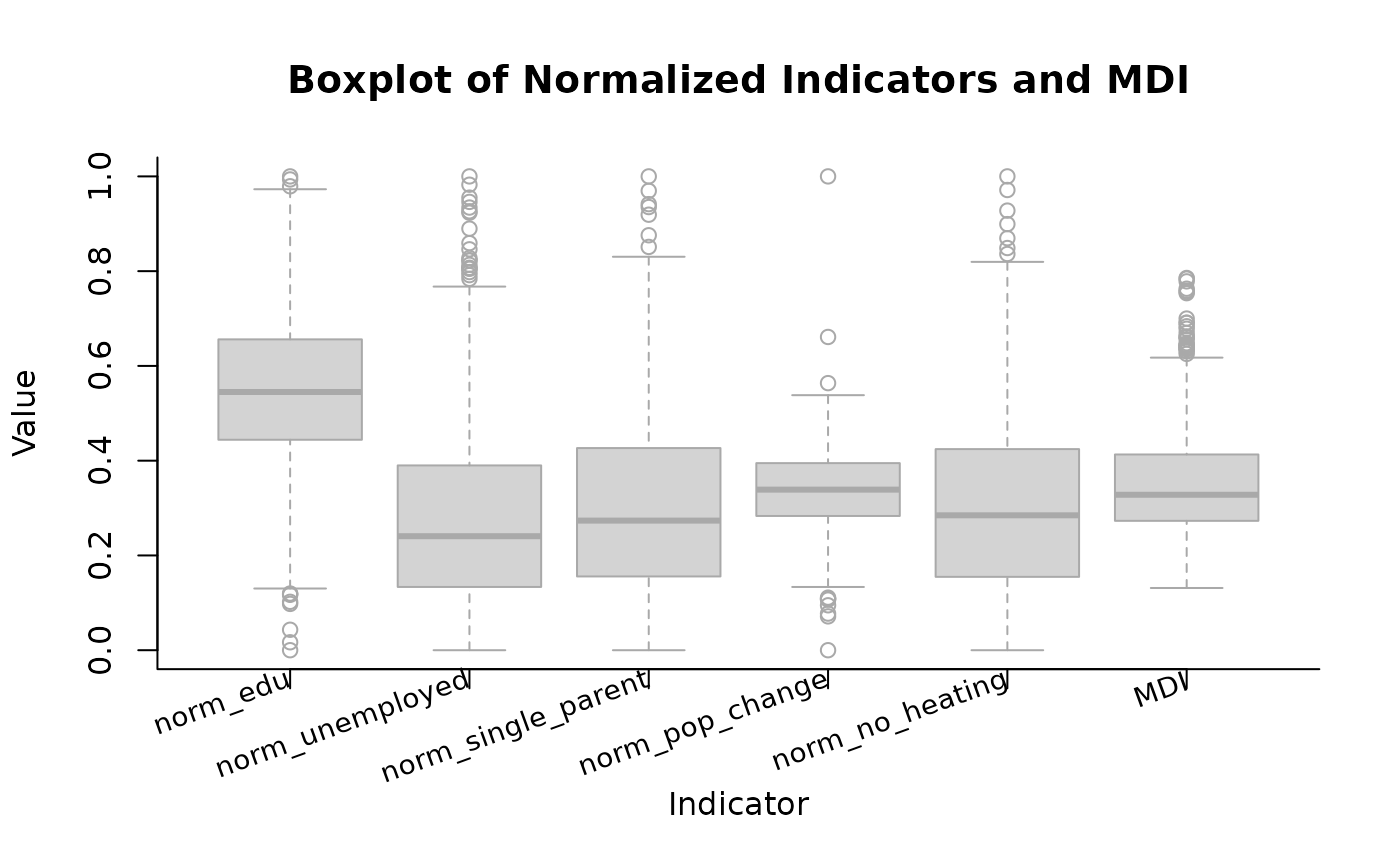 Analogously, to reproduce the histogram run
eval(mdi$mdi_detailed$histogram)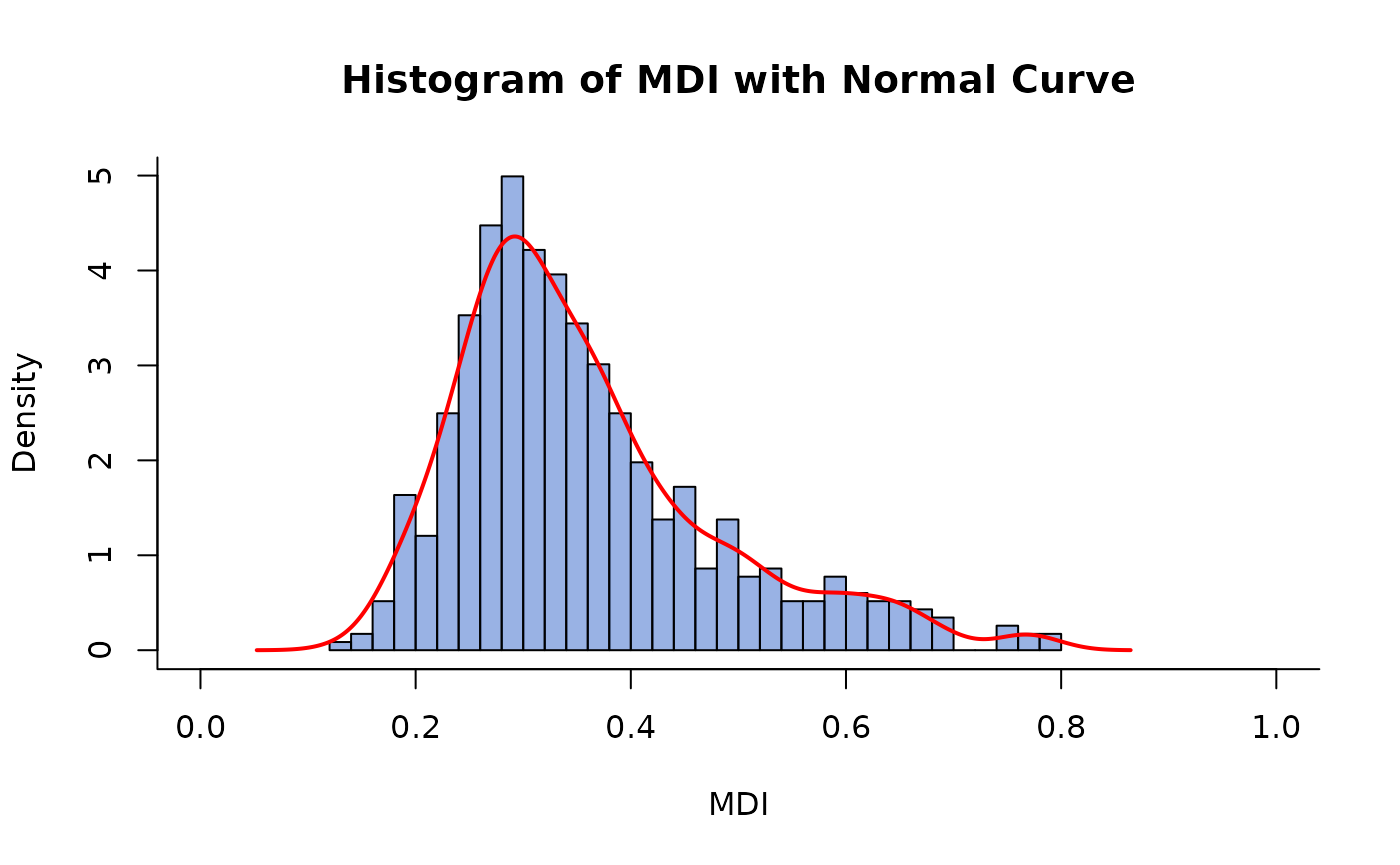
Inside pipes
Pipe |>
healthiar can be used inside the native pipes
|>. See the example below.
exdat_noise |>
  (\(df) {
    healthiar::attribute_health(
      approach_risk = df$risk_estimate_type,
      exp_central = df$exposure_mean,
      pop_exp = df$exposed,
      erf_eq_central = df$erf
      )$health_main$impact_rounded
    })()
Shorter, making use of the base R function with().
exdat_noise |>
      (\(df) {
        with(df, healthiar::attribute_health(
         approach_risk = risk_estimate_type,
         exp_central = exposure_mean,
         pop_exp = exposed,
         erf_eq_central = erf
         ))$health_main$impact_rounded
        })()
#> [1] 348464
Pipe %>%
healthiar can also be used inside magrittr pipes
%>% as follows.
exdat_noise %>%
  {
    healthiar::attribute_health(
      approach_risk = .$risk_estimate_type,
      exp_central = .$exposure_mean,
      pop_exp = .$exposed,
      erf_eq_central = .$erf
    )$health_main$impact_rounded
  }
Export and visualize
Exporting and visualizing results is out of scope of healthiar. To export and visualize, you can make use of existing functions in other packages beyond healthiar as indicated below.
Export results
Export as .csv file
write.csv(x = results_pm_copd$health_main, file = "exported_results/results_pm_copd.csv")Save as .Rdata file
save(results_pm_copd, file = "exported_results/results_pm_copd.Rdata")Export to Excel (as .xlsx file)
openxlsx::write.xlsx(x = results_pm_copd$health_main, file = "exported_results/results_pm_copd.xlsx")Abbreviations
BHD/bhd = baseline health data
CI = confidence interval
CBA/cba = cost-benefit analysis
exp = exposure
ERF = exposure-response function
RR/rr = relative risk
WHO = World Health Organization
YLL/yll = years of life lost